Only allow two IP's to access Minecraft Server
-
I'm trying to figure out how to only allow two IP's (from TCPShield) to access my Minecraft Server (from the WAN). My server keeps getting hammered by bots probing port 25565. They can't get in (not whitelisted), but their attempts get logged on my console and adds a bunch of junk entries. The folks at TCPShield said the way to fix this is to only allow access from their IP's (198.178.119.0/24
104.234.6.0/24). What I'm not entirely clear on is how this gets set up in the Firewall section of pfSense. I still get confused on "Source" "Destination." "Ports" and the how of only allowing those two IP addresses to access the Minecraft Server, and not allowing anyone else (except me on my LAN when I need to configure the server.) Also, where does the rule go in order. Top, or Bottom of rules? It's probably easy to do, but I can't figure it out.
Any help would be appreciated. Thanks -
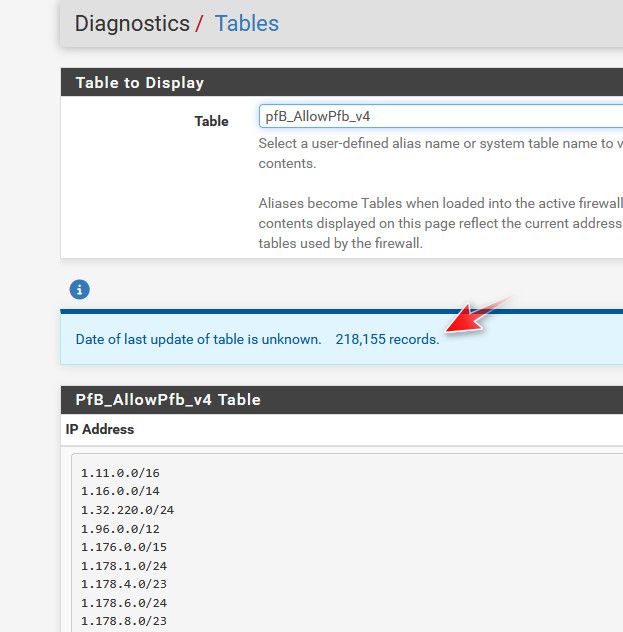
@FrankZappa on your port forward - use an alias for the source IP, and put in the ips or networks that you want to allow. If you allow 1.2.3.4, and someone is trying to talk to your wan IP to your port 25565 from say 4.5.6.7, it won't be forward so your server would never see the traffic.
example

That is the port forward to my plex server, that listens on 32400 - when traffic hits my wan (public IP) on port 23040 it forwards to my plex server 192.168.1.10 port 32400
But only if the source IP of the traffic (1.2.3.4 for example) is in the alias pfb_allowed_v4, this list contains the IPs from the US, and Belgium (family there currently) and other IPs like the ips that check to see if plex is available remotely, monitoring services (uptime robot is one) etc..
I use pfblocker to create the alias because I have lots of ips and networks to allow. But you only have a few IPs or networks you want to allow, you could just use pfsense alias.
This port forward really shouldn't come to play when you have some local device on your network talking to your minecraft server - only when traffic is hitting your wan IP from the internet, that needs to be forwarded.
-
@johnpoz Thanks johnpoz (as always).
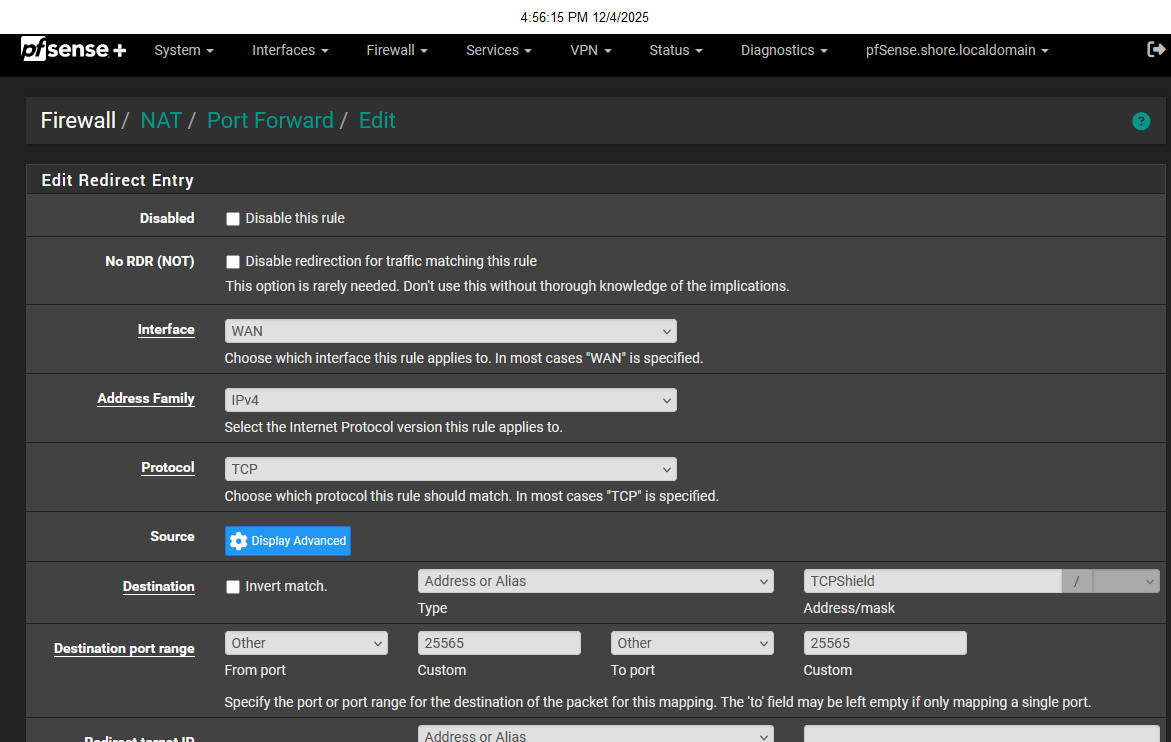
Here's where I get screwed up; I created the alias with the two IP's from TCPShield. However, when I port forward, I'm not entirely clear on what goes in each field. My confusion is the box I enter the alias in is the "destination" box. Is that where the alias goes? Thanks Again.
-
@FrankZappa no the alias would be source.. click that display advanced next to source.
Destination would be your wan address
-
@johnpoz Wouldn't the destination be my Minecraft Server LAN address?

Here's my current config:

-
@FrankZappa looks about right.
edit: no not wan subnets - would be wan address.
-
@johnpoz That's where I don't understand pfSense firewalls. Why would the destination be my WAN address? Wouldn't I want the destination to be the LAN address of my Minecraft server e.g. 192.168.1.2? Otherwise, how would the two allowed IP's (Source) know where the server resides? Or, is the "Redirect target IP" where I put in my LAN IP for the server? So if I change the destination to WAN, do I need to put in my WAN IP address, or does pfSense already know that. Sorry for all the questions, but pfSense firewalls aren't very intuitive (at least for me). Thanks
-
@FrankZappa what ip address is someone going to go to from the internet - your public IP, or some rfc1918 address on your network behind pfsense.
internet ----> wan (pfsense) lan ---> your server rfc1918 address.
In the port forward the redirect IP is the ip of your server running minecraft.
Pfsense will see the traffic on its internet interface and say oh I need to send it to say 192.168.100.42, then the firewalll rule will created by the portforward will allow the traffic to the 192.168.100.42 address
In my example port forward to my plex server.. here is the firewall rule that allows the traffic

Unless you were routing public IP space to behind pfsense - you need a port forward, if you were routing public IP space behind pfsense, then all you would need is a firewall rule to allow the traffic to the public IP sitting behind pfsense.
So if I change the destination to WAN, do I need to put in my WAN IP address
You just pick the drop down that says wan address, you picked wan subnet - which is the network your wan IP is on.. But you only have 1 IP, not the whole network..
-
@johnpoz Thanks johnpoz. appreciate your patience and knowledge.
-
@johnpoz johnpoz, after looking at your setup for Plex, I'm curious about something. Is there a way to have Plex listen on a custom port (of my choosing) and set up pfSense to forward to that port (and LAN IP)? I don't know that I can set it exactly like you have because I never know what IP my phone carrier will assign me, so singling out known IPs won't work for me. Unless there's some way to set up a proxy, but I'm just reaching now. If I use a different port for Plex, would that increase the security? Thanks
-
@FrankZappa you can not change the port plex itself listens on - but sure you can use a port on your wan different than the 32400, I use 23040 myself.
You can for sure limit the IPs that can talk to by region.. Your phone isn't going to have an IP from say Germany when you are in the US for example.
But no you wouldn't be able to lock down to a specific IP.. My users are either in the US, or Belgium - so I limit what IPs can talk to my 23040 port on the wan to those regions (easy to do with pfblocker)..
But what does that have to do with 2 IPs talking to your minecraft server.
Here is the setup in plex to use an external port different than your 32400 port

-
@johnpoz Yeah, sorry, I'm crossing streams here. I was originally discussing my Minecraft Server, but you referenced how you have your Plex server set up in pfSense. I have a Plex Server as well so I thought I'd get your perspective on setup. Apologies for the confusion. As always, thanks for the assist.
-
@FrankZappa no problem.. Yeah you run into issues with lock down when your not sure off the IPs traffic will be coming from.
I tried to be really tight with it at first, having the users let me know what public IP they were using - this proved difficult with users having a clue to what their public IP was ;) heheh I then said ok I will see what IP/network they are coming from and lock it down that way.. Their ips would change, or they would use their phone to view on cell only. Or they would use it while traveling.. I get alerted every time a new IP connects to plex, and I saw one of my friends coming from an IP from different state.. I checked with them - and they were on a trip, and using plex app on the airbnb they were staying at ;) I reminded him please use guest mode when doing that - or for sure log out when you leave ;)
I toyed with having my users have to use a vpn to talk to my plex - that was way to complicated for them, might work for their phones, but pretty much none of them have the ability to run a vpn from their home network and route just for plex via policy routing, etc. ;)
Trying to lock it down too tight became a pita.. So I opened it up - only allow access from countries my friends and family would be coming from. My niece was recently visiting South Korea - they were being relayed, I opened it up for them while they were there to be able to get direct access.
It is always going to be give and take with locking down access, ease of use vs security, etc. The port change is more just for cutting down on log spam, and knowing if a connection is really from one of my users or just some random connection something scanning for plex, since it uses 32400..
Keep in mind even if you lock down what IPs can talk to plex - relay can circumvent that. You could turn that off - but now you run into for whatever reason user can not talk directly and just no access, vs some sort of access via relay. Relay not the best, but they can watch stuff - even if not at 1080, and server works harder having to transcode, etc.
Other option would be like a cloudflare tunnel - so only cloudflare can talk to your plex and all your traffic tunnels through that. I had issues complaining about performance when did that. And to be honest not even sure if 100% in line with cloudflare tos on that service??
So as always with security there are compromises - I lock down who can directly talk to my plex server via country. Get alerted when new IPs connect (script you can run) and call it a day. Use a different port, so I know what is for sure not my users trying to talk to plex. But to be honest I don't see a lot of that traffic.
-
@FrankZappa said in Only allow two IP's to access Minecraft Server:
That's where I don't understand pfSense firewalls. Why would the destination be my WAN address? Wouldn't I want the destination to be the LAN address of my Minecraft server e.g. 192.168.1.2? Otherwise, how would the two allowed IP's (Source) know where the server resides? Or, is the "Redirect target IP" where I put in my LAN IP for the server? So if I change the destination to WAN, do I need to put in my WAN IP address, or does pfSense already know that. Sorry for all the questions, but pfSense firewalls aren't very intuitive (at least for me). Thanks
Be aware, NAT is not a pfSense thing at all. Every router, TP-Li**, Netge.... your ISP router (not being a modem) on planet earth has this NAT function. Some of use are using it for over 50 years now.
Long story short :
In the begging, RFC commissions adopted the Ethernet/ Internet and defined 255 x 255 x 255 x 255 IP addresses. Nice. 4,2 Billion, that will do for a while. A couple of thousands of early adopters start using this new IP thing, and there was plenty of space. Some large structures (companies) even "reserved" for their own future use an entire /16 block or 2^16 or 65 535 different IP addresses for whatever the future might bring.
You already know this part of the story : they were wrong. That is, no one has foreseen that the IP (Internet) protocol would be adopted by everybody, and became the de-facto standard. For some totally wild reason, everybody wants a Internet connection these days. Already in the eighties (last century) it became clear : there won't be enough IP addresses.If you have 22 minutes and want to know what happened, why, be who, and how they did it : THE UNTOLD STORY: How the PIX Firewall and NAT Saved the Internet.
In he old days, you had to set up firewall - and NAT rules by hand - you, your hands, your head, the keyboard, and the command line. Most routers these days use a GUI, but what happens behind the screen is still the same thing.
A NAT, also called PAT rule are actually 2 things :- First rule : an incoming, on the WAN interface, (example) 'port 8080 TCP connection is mapped to port '80 TCP' to a device on your LAN, for example, 192.168.1.2.
This means that, when you're outside, some 'on the Internet', and you use your WAN IP address like 99.88.77.66 and you select port 8080, for example, in your browser you would type
http://99.88.77.66:8080 then that IP connection would wind up talking on your LAN network with port 80, most probably a web server that runs on your 192.168.1.2 device, using port 80 (and TCP). Your router, pfSense, "Network Address and Port" translates the incoming connection from your device, let's say your phone, to your LAN based web server. - As incoming traffic, on WAN, on any router on planet earth is forbidden by default, you have to give your router (pfSense, and any other router you might use) permission (== pass) to reach this LAN 192.168.1.2 device. This means you have to create a 'pass' firewall rule on your WAN interface so you can authorize this incoming traffic :
From 'everybody' == every existing IP **
With every possible 'source' port (port have a 1 to 65534 range)
To (destination) is your WAN IP ("ISP") address
Destination port '8080'
Take note : for pfSense, and most routers out there, when your create a NAT rule, you also create a 'linked' WAN firewall 'pass' rule.
** Yes, this :
Only allow two IP's to access Minecraft Server
is possible as you've seen.
Instead of accepting from 'everybody' (or "any") you limit the access for one or several IP "Internet" addresses : just place them all in an pfSense "Alias" and use this Alias as the 'source'.When you have created a NAT rule, you can see this WAN firewall rule on your WAN interface.
If you have several WAN firewall rule, you might have to arrange their order ( ! ).Btw : you've limited your NAT rule by accepting only traffic from two known IP addresses, that's already a good thing.
A better solution exist.
And NAT rule(s) needed.
Fire up the OpenVPN (or other VPN) on your pfSense.
Every device that needs to access your (minecraft) server uses a VPN client app. When they want to use your server, they fire up the app, and connect.
Now they can uses your "192.168.1.2" (your server) device, and the communication between them is secured.In a nearby future, IPv4, which was the reason NAT had to be invented, will be less used. The future is already their : IPv6.
IPv6 doesn't need NAT.
You still have place a 'pass' WAN firewall rule to let the traffic into your LAN, and when done.
No more need for Address Translation as every device will have (already has) its globally unique IPv6 address. - First rule : an incoming, on the WAN interface, (example) 'port 8080 TCP connection is mapped to port '80 TCP' to a device on your LAN, for example, 192.168.1.2.
-
@Gertjan Thanks Gertjan. I may have to study what you just said for a week to figure out how to put this into practice ;) Appreciate the help.
-
@johnpoz Thanks johnpoz
-
@FrankZappa more than welcome - to be honest the weakest thing with plex because it's outside your network where they could auth as you. I would for sure use a strong password and turn on 2fa.
Since you do open it to the internet - there are risk of some local exploit, but I think the weakest part of the chain is your actual account on their servers.
But again any time you expose anything to the internet there are risks. Put your plex in its own segment, if it did get exploited - its isolated from rest of your network, and what would be at risk is your media on your plex.
-
@johnpoz johnpoz, Happy New Year. I'm having difficulties getting my PLEX server to connect to remote access. I wanted to change the port to something other than the default, but when I do, I cant connect. Any thoughts on what I'm doing wrong? My config is below:


-
@FrankZappa do you have any floating rules? Is pfsense behind something doing nat?
First step in troubleshooting any sort of port forward or rule on your wan - does the traffic even get to you..
Do a packet capture on your wan.. Go can you see me . org and send traffic to that port - do you see it?
If you do, is it blocked in any of your firewall rules? Make sure your logging any denies, your default deny, etc.
If you see it on your wan, and no answer - then sniff on the lan side interface - do you see pfsense send the traffic on.
Your 1 rule that makes no sense to me is why are you blocking wan subnet to lan subnets? When would you think that would ever come into play??
-
@johnpoz I block wan subnet to lan subnets because.....uhhhhh......that one guy said to do it. You know, that one guy? IOW, no idea why I did that other than thinking I know what the hell I'm doing, which I dont.