Netgate Discussion Forum
    • Categories
    • Recent
    • Tags
    • Popular
    • Users
    • Search
    • Register
    • Login

    Kernel Panic when Upgrading to 2.8.0 beta

    Scheduled Pinned Locked Moved Problems Installing or Upgrading pfSense Software
    86 Posts 14 Posters 19.6k Views 15 Watching
    Loading More Posts
    • Oldest to Newest
    • Newest to Oldest
    • Most Votes
    Reply
    • Reply as topic
    Log in to reply
    This topic has been deleted. Only users with topic management privileges can see it.
    • stephenw10S Online
      stephenw10 Netgate Administrator
      last edited by

      Nope at the pfSense CLI (or via the gui command prompt page). So you have to manually boot to 2.8 once or run it from 2.7.2 before upgrade.

      GertjanG 1 Reply Last reply Reply Quote 0
      • GertjanG Offline
        Gertjan @stephenw10
        last edited by

        @stephenw10

        Ah, ok, right. Of course.
        But : what if his 2.8.0 doesn't boot /didn't boot (because of the kernel boot failure ) ?

        No "help me" PM's please. Use the forum, the community will thank you.
        Edit : and where are the logs ??

        1 Reply Last reply Reply Quote 0
        • stephenw10S Online
          stephenw10 Netgate Administrator
          last edited by

          Then you need to manually set that disabled at the loader prompt one time to boot into 2.8 first. Then run that command to allow it to boot normally after that.

          1 Reply Last reply Reply Quote 0
          • T Offline
            thrx1 @dominik.b
            last edited by

            @dominik-b said in Kernel Panic when Upgrading to 2.8.0 beta:

            @thrx1

            I just want to verify your steps because I'm facing the same Wi-Fi problem.

            First time I rebooted I didn't press the '3' key quickly enough to 'Escape to loader prompt' and so I got the damn error.
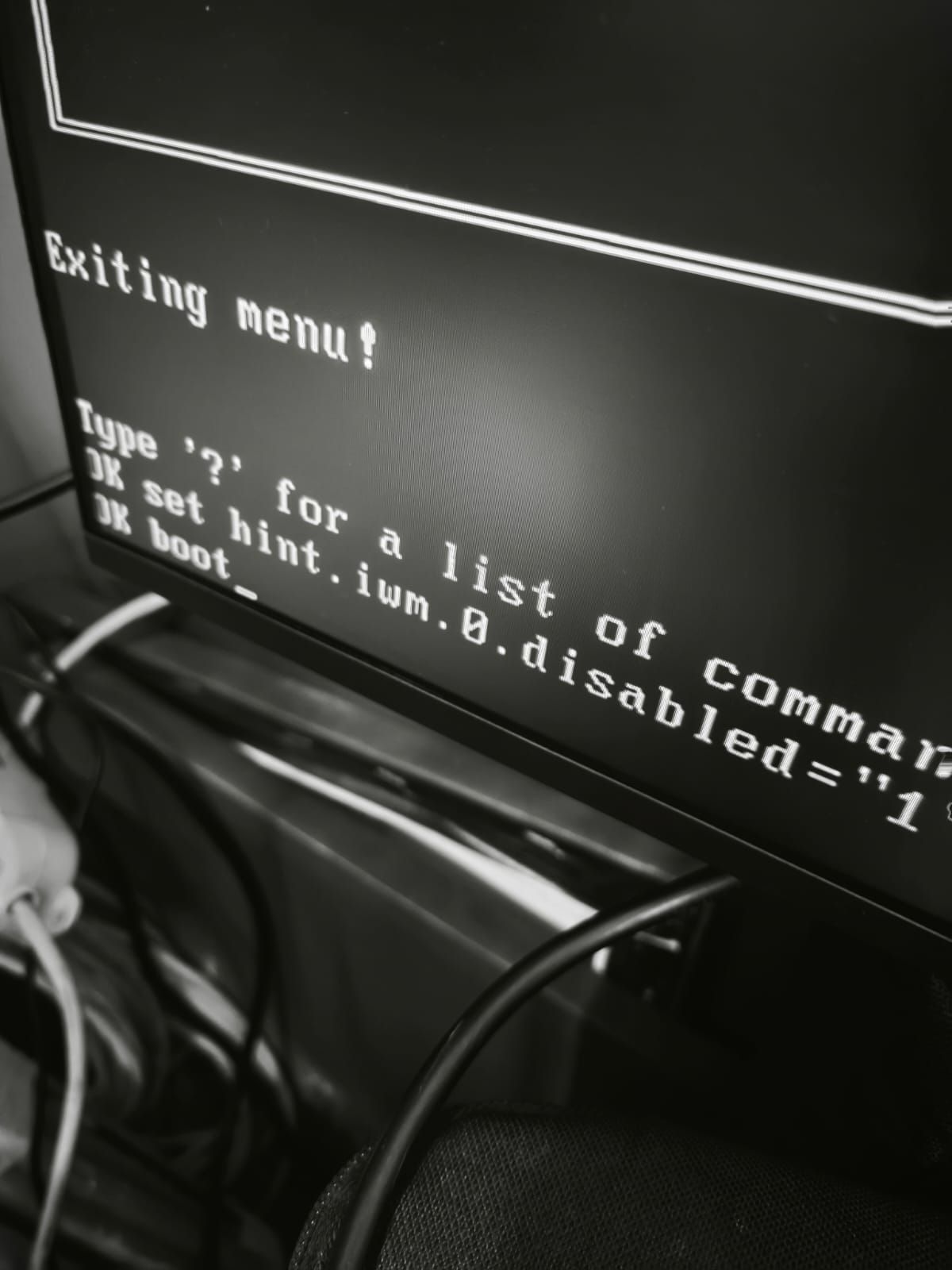
            I rebooted (power cycle the NUC pfSense runs on - probably a better way than that) and then pressed '3', entered the loader and typed in

            set hint.iwm.0.disabled="1"
            

            followed by:

            boot
            

            and it completed the update and pfSense worked ok - until I rebooted. I then followed the same steps above to get it to boot and once it was running again, I opened the Web GUI and navigated to
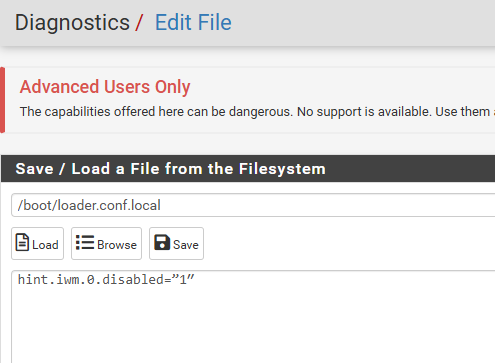
            Diagnostics > Edit File
            entered the following path

            /boot/loader.conf.local
            

            and the requisite data

            hint.iwm.0.disabled="1"
            

            before hitting 'save'.

            pfSense has booted fine since then for me.

            It sounds like some people may have an existing file `"/boot/loader.conf.local" but that was not the caese for my install (or at least that's what it looked like when I loaded the file). YMMV.

            1 Reply Last reply Reply Quote 1
            • T Offline
              thrx1 @stephenw10
              last edited by

              @stephenw10 said in Kernel Panic when Upgrading to 2.8.0 beta:

              Hmm, interesting if it's really disabled in the BIOS pfSense shouldn't see it at all. Something not working right there.

              Reply

              Correct. Under the list of devices in the BIOS on the NUC, WiFi is not checked.

              1 Reply Last reply Reply Quote 0
              • w0wW w0w referenced this topic on
              • T Offline
                tomasz.kozlowski
                last edited by

                Do you have any info if this has been fixed in 2.8.1?

                S 1 Reply Last reply Reply Quote 0
                • S Offline
                  stewartv8 @tomasz.kozlowski
                  last edited by

                  @tomasz.kozlowski just updated to ver 2.8.1 with no problems.

                  1 Reply Last reply Reply Quote 0
                  • stephenw10S Online
                    stephenw10 Netgate Administrator
                    last edited by

                    The driver firmware loading issue is not fixed in 2.8.1. It's still broken upstream AFAIK. You will still need to apply one of the workarounds.

                    D 1 Reply Last reply Reply Quote 0
                    • D Offline
                      darkeyesz @stephenw10
                      last edited by

                      @stephenw10 Hello. Updating 2.8.1 same problem. I tryed the workaround, but if I create the file /boot/loader.conf.local and put the string at reboot same problem. For me only works if I set it manually.

                      1 Reply Last reply Reply Quote 0
                      • stephenw10S Online
                        stephenw10 Netgate Administrator
                        last edited by

                        What exactly are you seeing? And what exactly are you adding?

                        If it works manually at the loader prompt it will be possible to add it to the loader file.

                        D 1 Reply Last reply Reply Quote 0
                        • D Offline
                          darkeyesz @stephenw10
                          last edited by

                          @stephenw10 It wont work if later I add it into the loader file. I create /boot/loader.conf.local and added hint.iwm.0.disabled="1" but if I reboot same problem it stops and I have to boot manually.

                          1 Reply Last reply Reply Quote 0
                          • stephenw10S Online
                            stephenw10 Netgate Administrator
                            last edited by

                            Hmm, well that should do exactly the same thing. Can we see some screenshots or console output?

                            D 1 Reply Last reply Reply Quote 0
                            • D Offline
                              darkeyesz @stephenw10
                              last edited by

                              @stephenw10 Screenshot 2025-12-02 171013.png

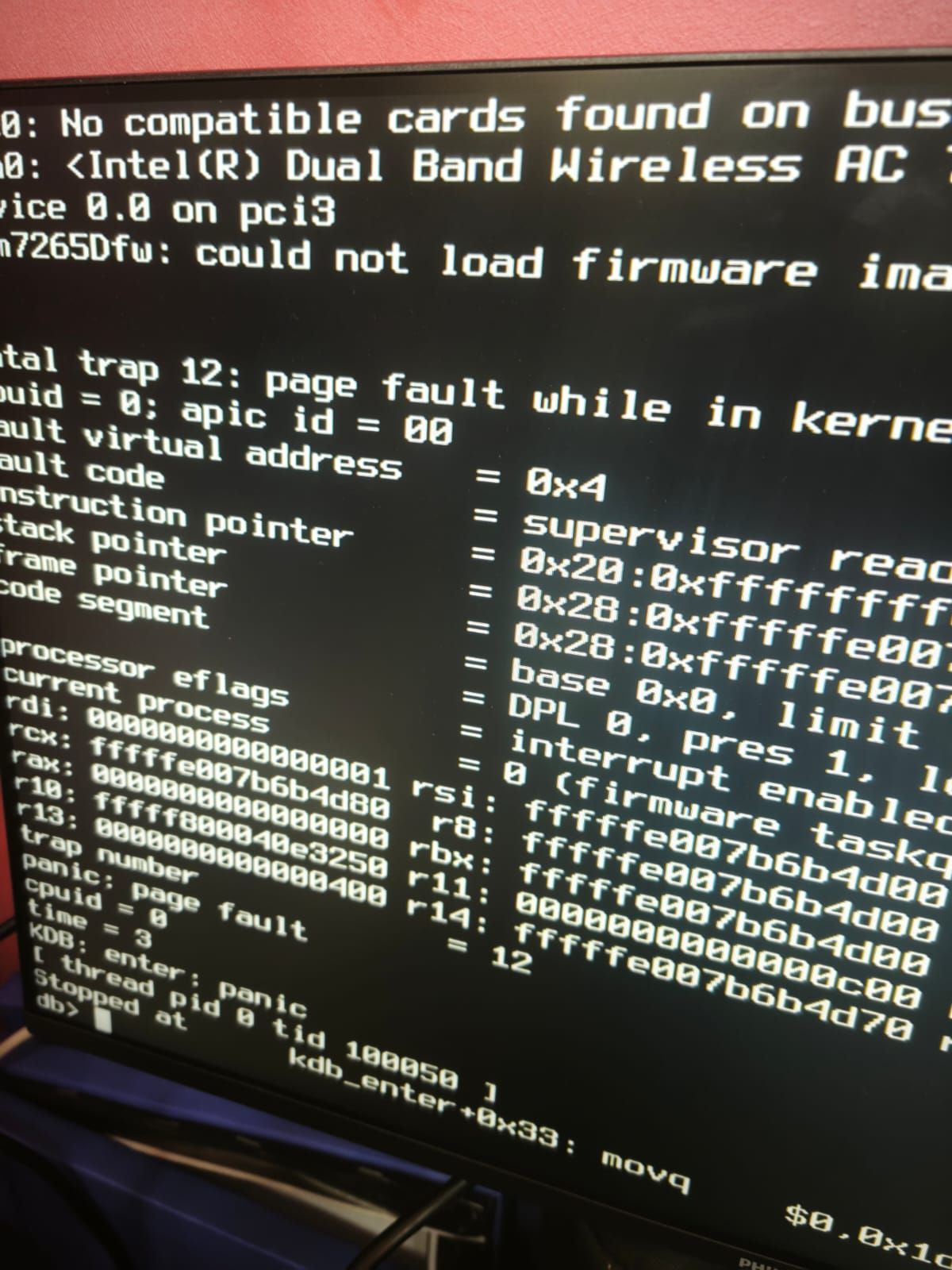
                              But If I reboot

                              WhatsApp Image 2025-12-02 at 17.17.01.jpeg

                              If I set it manually it boot

                              WhatsApp Image 2025-12-02 at 17.17.01 (1).jpeg

                              1 Reply Last reply Reply Quote 0
                              • stephenw10S Online
                                stephenw10 Netgate Administrator
                                last edited by

                                Your loader file has quotation marks (") preceding the 1 but double ticks after it ('') . They should both be quotation marks.

                                D 1 Reply Last reply Reply Quote 0
                                • D Offline
                                  darkeyesz @stephenw10
                                  last edited by

                                  @stephenw10 that was my mistake!!! Thank you!

                                  KOMK 1 Reply Last reply Reply Quote 1
                                  • KOMK Offline
                                    KOM @darkeyesz
                                    last edited by

                                    @darkeyesz I'm curious about how that would even happen in the first place. Like you typed the start ", then 1, then decided to spice things up by doing the end " differently? You forgot what character you typed literally 2 characters earlier? How??

                                    1 Reply Last reply Reply Quote 0
                                    • stephenw10S Online
                                      stephenw10 Netgate Administrator
                                      last edited by

                                      I'd guess it was copy/paste the line but accidentally miss the last character. Then add it as ticks by mistake. It's easy to overlook.

                                      1 Reply Last reply Reply Quote 1
                                      • KOMK Offline
                                        KOM
                                        last edited by

                                        I suppose. My next guess was going to be 'cat on the keyboard' 😁

                                        1 Reply Last reply Reply Quote 2
                                        • First post
                                          Last post
                                        Copyright 2025 Rubicon Communications LLC (Netgate). All rights reserved.