Netgate Discussion Forum
    • Categories
    • Recent
    • Tags
    • Popular
    • Users
    • Search
    • Register
    • Login

    Watchguard Firebox M400/M500

    Scheduled Pinned Locked Moved Hardware
    691 Posts 61 Posters 983.1k Views 50 Watching
    Loading More Posts
    • Oldest to Newest
    • Newest to Oldest
    • Most Votes
    Reply
    • Reply as topic
    Log in to reply
    This topic has been deleted. Only users with topic management privileges can see it.
    • stephenw10S Offline
      stephenw10 Netgate Administrator
      last edited by

      Are you seeing it fail to reboot? Otherwise you don't need that.

      J 1 Reply Last reply Reply Quote 0
      • J Offline
        jriofrio @stephenw10
        last edited by

        @stephenw10 I think was yesterday that you asked me if it reboots ok.
        so earlier today i reboot it through serial console and it hangs...
        I used to just turn it off after i did some changes. i am waiting for a sata drive to arrive so it is not online just yet. I would like to solve all the issues before goes online.
        hope the update of the Me 9.1 goes well too.

        1 Reply Last reply Reply Quote 1
        • K Offline
          korenchkin @jriofrio
          last edited by

          @jriofrio this is efi shell,it just needs filesystem...it should pick up the right file...i think...for efi there is no mbr/boot sector...bios should know the name of the file to load(and be set to boot uefi,hopefully default)...i'm not certain about mbr/gpt partition table,windows uefi needs gpt,but here i probably didn't overthink it and it just booted...just try and see (and google for uefi flash boot/uefi shell,if something does not work right)

          J 1 Reply Last reply Reply Quote 0
          • J Offline
            jriofrio @korenchkin
            last edited by

            @korenchkin .... Alright, thank you very much for the clarification, it really did help.

            I did the flashing and tested it. I restart it by the serial console and the web interface, both worked as was hoping for.
            A little reading with your comment about efi it help a lot.

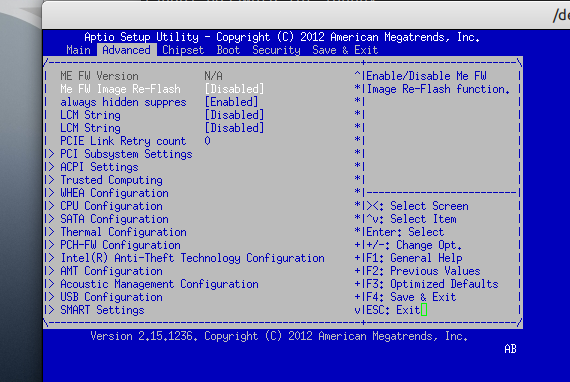
            anyway, a quick question if i may. Before the flashing ME91, i was checking the bios and i saw that the image re-flash for the ME was disable, so i enable it, just in case.
            Q: should i disable it back?
            Screenshot from 2025-12-02 17-05-35.png

            thanks one more time...

            K 1 Reply Last reply Reply Quote 0
            • stephenw10S Offline
              stephenw10 Netgate Administrator
              last edited by

              Normally you set that and it applies to the following boot only and will automatically go back to disabled.

              Out of interest I found I didn't need to set that to update the ME. Moving the jumper was sufficient.

              1 Reply Last reply Reply Quote 0
              • K Offline
                korenchkin @jriofrio
                last edited by

                @jriofrio nice,glad it worked,for both of you i guess :)
                I think now you know same as me,so treat your bios as yours,you have it updated,you will not update it again i guess,so maybe it will help against malware to have it disabled...

                1 Reply Last reply Reply Quote 0
                • stephenw10S Offline
                  stephenw10 Netgate Administrator
                  last edited by

                  I should add that, as predicted, after updating the ME my i3-4160 successfully reboots. For the first time in like 7 years. Amazing! ๐Ÿ‘

                  J 1 Reply Last reply Reply Quote 0
                  • J Offline
                    jriofrio @stephenw10
                    last edited by

                    @stephenw10 .... ๐Ÿ˜‚... Glad to hear it... It feels good when everything works as it should.

                    M 1 Reply Last reply Reply Quote 1
                    • M Offline
                      Mookatroid @jriofrio
                      last edited by

                      I was not experiencing reboot issues, but my OCD kicked in so I followed the process ...
                      https://forum.netgate.com/topic/124734/watchguard-firebox-m400-m500/588
                      ... and applied the ME update via AFUDOS.EXE /ME and all went well. Maybe there are other benefits of ME 9.1.40.1000 ๐Ÿ˜

                      K 1 Reply Last reply Reply Quote 0
                      • K Offline
                        korenchkin @Mookatroid
                        last edited by

                        @Mookatroid ah,a fellow flashaholic :)

                        M 1 Reply Last reply Reply Quote 1
                        • M Offline
                          Mookatroid @korenchkin
                          last edited by

                          @korenchkin LMAO ๐Ÿค“

                          1 Reply Last reply Reply Quote 0
                          • stephenw10S Offline
                            stephenw10 Netgate Administrator
                            last edited by

                            Well you'd better upgrade your CPU to take advantage of it then. ๐Ÿ˜‰

                            M 1 Reply Last reply Reply Quote 0
                            • M Offline
                              Mookatroid @stephenw10
                              last edited by

                              @stephenw10

                              Already ordered

                              Intel Xeon E3-1265L V3 LGA-1150 CPU Processor 2.50 GHz 4-Core 8MB 45W GPU P4600

                              Same CPU I installed in my previous M400.
                              But delivery will take bit with the CPU coming from across the pond.

                              1 Reply Last reply Reply Quote 0
                              • First post
                                Last post
                              Copyright 2025 Rubicon Communications LLC (Netgate). All rights reserved.