pfsense restarts always
-
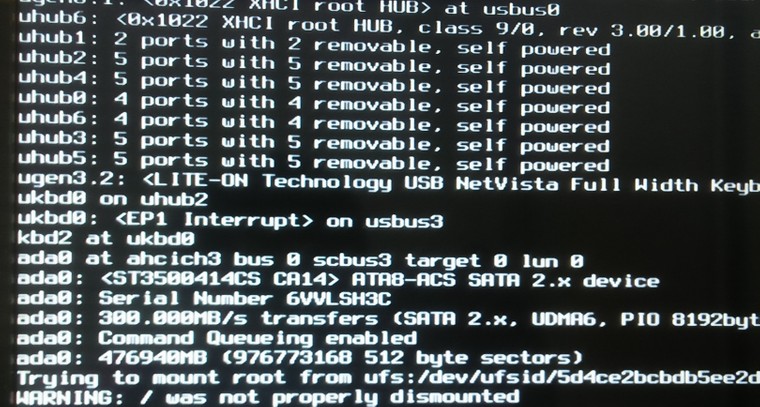
few months ago, my box works fine this morning I saw my box this way always restarts repeatedly and I cant used to log-in to my web gui. :(
-
Your screen shows the classic boot process.
No errors, nothing, all seems fine.If the log contains reasons for the reboot, you'll find it just before the initial
Copyright (c) 1992-2018 The FreeBSD Project.
Copyright (c) 1979, 1980, 1983, 1986, 1988, 1989, 1991, 1992, 1993, 1994
        The Regents of the University of California. All rights reserved.
FreeBSD is a registered trademark of The FreeBSD Foundation.
FreeBSD 11.2-RELEASE-p10 #9 4a2bfdce133(RELENG_2_4_4): Wed May 15 18:54:42 EDT 2019
    root@buildbot1-nyi.netgate.com:/build/ce-crossbuild-244/obj/amd64/ZfGpH5cd/build/ce-crossbuild-244/pfSense/tmp/FreeBSD-src/sys/pfSense amd64
FreeBSD clang version 6.0.0 (tags/RELEASE_600/final 326565) (based on LLVM 6.0.0)
......
ugen3.1: <Intel UHCI root HUB> at usbus3
ugen1.1: <Intel UHCI root HUB> at usbus1
ugen4.1: <Intel EHCI root HUB> at usbus4
uhub0: <Intel UHCI root HUB, class 9/0, rev 1.00/1.00, addr 1> on usbus3
uhub1: <Intel EHCI root HUB, class 9/0, rev 2.00/1.00, addr 1> on usbus4
ugen0.1: <Intel UHCI root HUB> at usbus0
uhub2: <Intel UHCI root HUB, class 9/0, rev 1.00/1.00, addr 1> on usbus1
uhub3: <Intel UHCI root HUB, class 9/0, rev 1.00/1.00, addr 1> on usbus0
ugen2.1: <Intel UHCI root HUB> at usbus2
uhub4: <Intel UHCI root HUB, class 9/0, rev 1.00/1.00, addr 1> on usbus2
.......
If the reason was some software bug, kernel or other, chances are big that you will find 'error' messages in the log.
If the origin is a hardware failure, its more probable that there are no indications at all. After all, a systems that locks up can't write a line to file neither. It's just plain dead.Hardware failure : power, RAM, bad drive, etc.
-
@Gertjan thank you sir, for your fast response I did rebooted to single user mode and run the fsck -y command and it saved my day. But there are crash reports on my dashboard it looks like this pfsense error.txt does this mean that my hard drive or RAM has the cause of this error? Thank you sir.
-
@bokikay said in pfsense restarts always:
it looks like this pfsense error.txt does this mean
Last line in this log :
panic.txt06000010113533352537 7221 ustarrootwheelufs_dirbad: /: bad dir ino 54012315 at offset 5120: mangled entry ...'ufs' == the file system.
This could be the disk going bad.
Or some one ripped out the AC plug - not respecting a clean shutdown ...
Corrupted data on disk a real show stopper. -
@Gertjan thank you very much sir after I run the fsck -y command the reboot loop stop and it back to its normal operation. I hope i could not see crash report again..

Hello! It looks like you're interested in this conversation, but you don't have an account yet.
Getting fed up of having to scroll through the same posts each visit? When you register for an account, you'll always come back to exactly where you were before, and choose to be notified of new replies (either via email, or push notification). You'll also be able to save bookmarks and upvote posts to show your appreciation to other community members.
With your input, this post could be even better 💗
Register LoginPrivacy Policy · Cookie Policy