Netgate Discussion Forum
    • Categories
    • Recent
    • Tags
    • Popular
    • Search
    • Register
    • Login
    Introducing Netgate Nexus: Multi-Instance Management at Your Fingertips.

    DMZ not working

    Scheduled Pinned Locked Moved Routing and Multi WAN
    11 Posts 5 Posters 2.0k Views 5 Watching
    Loading More Posts
    • Oldest to Newest
    • Newest to Oldest
    • Most Votes
    Reply
    • Reply as topic
    Log in to reply
    This topic has been deleted. Only users with topic management privileges can see it.
    • frogF
      frog
      last edited by

      Hi and sorry but I can't find a setup document on how to configure this. I have a working lan to wan and have configured Opt1 as a DMZ given it a 172.16.0.1/24 subnet (don't need a /16). butno device can access the internet.

      Ideally I would like to get a setup doc. If some kind sole could put up a link.

      Many thanks
      Chris

      1 Reply Last reply
      Reply Quote 0
      • H
        HAZAME
        last edited by

        Did you setup your NAT outbound rules for the DMZ network?

        1 Reply Last reply
        Reply Quote 0
        • johnpozJ
          johnpoz LAYER 8 Global Moderator
          last edited by

          And what rules did you created on opt1? When you create new interface be it native or a vlan - no rules are created.

          While the automatic outbound nat (default) would create the needed outbound nat - without rules to allow access on opt1, no nothing would have any access.

          An intelligent man is sometimes forced to be drunk to spend time with his fools
          If you get confused: Listen to the Music Play
          Please don't Chat/PM me for help, unless mod related
          SG-4860 26.07 | Lab VMs 2.9.0, 26.07

          frogF 1 Reply Last reply
          Reply Quote 0
          • Bob.DigB
            Bob.Dig LAYER 8
            last edited by

            https://www.youtube.com/watch?v=QFk5jX-oeSo

            1 Reply Last reply
            Reply Quote 1
            • frogF
              frog @johnpoz
              last edited by

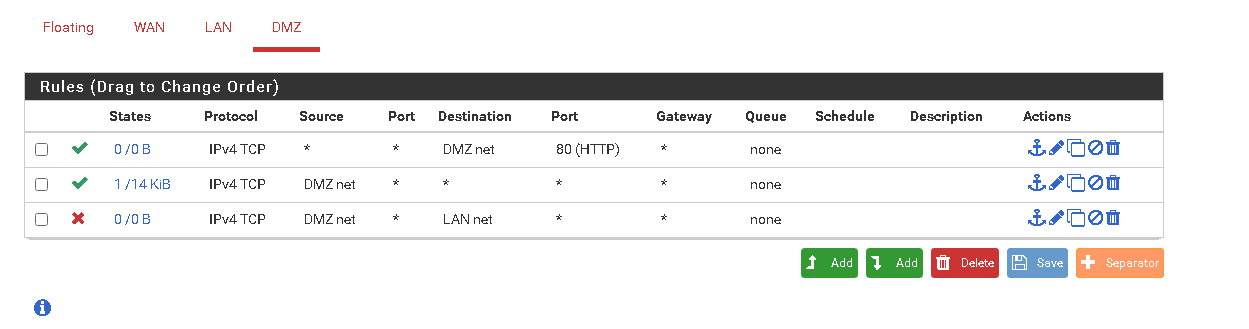
              @johnpoz thx for the pointers. no rules in DMZ on firewall. Have now put these. nothing so far but am remote so could be working
              aac167a6-3f8e-4576-afb6-7d6a1e9f97f1-image.png

              1 Reply Last reply
              Reply Quote 0
              • frogF
                frog
                last edited by

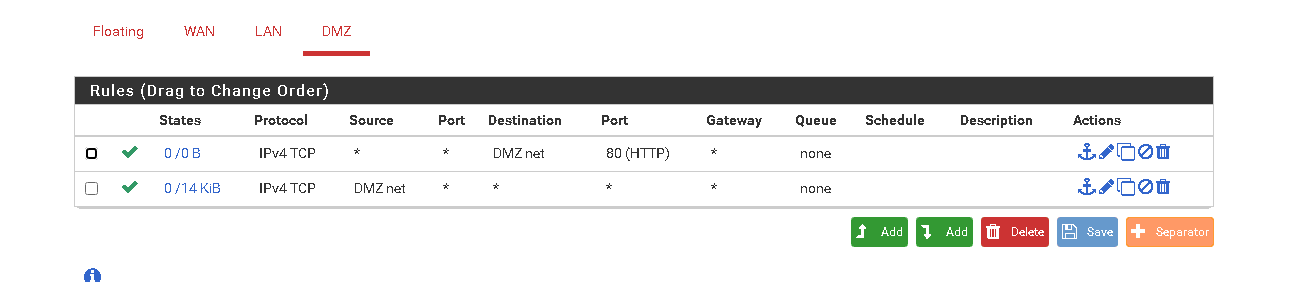
                not sure if this should be better.
                b9650ab5-1a28-4d70-9315-d659ec4b06f6-image.png

                JeGrJ 1 Reply Last reply
                Reply Quote 0
                • johnpozJ
                  johnpoz LAYER 8 Global Moderator
                  last edited by johnpoz

                  Well without allowing udp, how you going to get DNS?

                  Also zero reason to add any rules to dmz net, since devices don't talk to pfsense (the gateway) to talk to other devices on their own network.

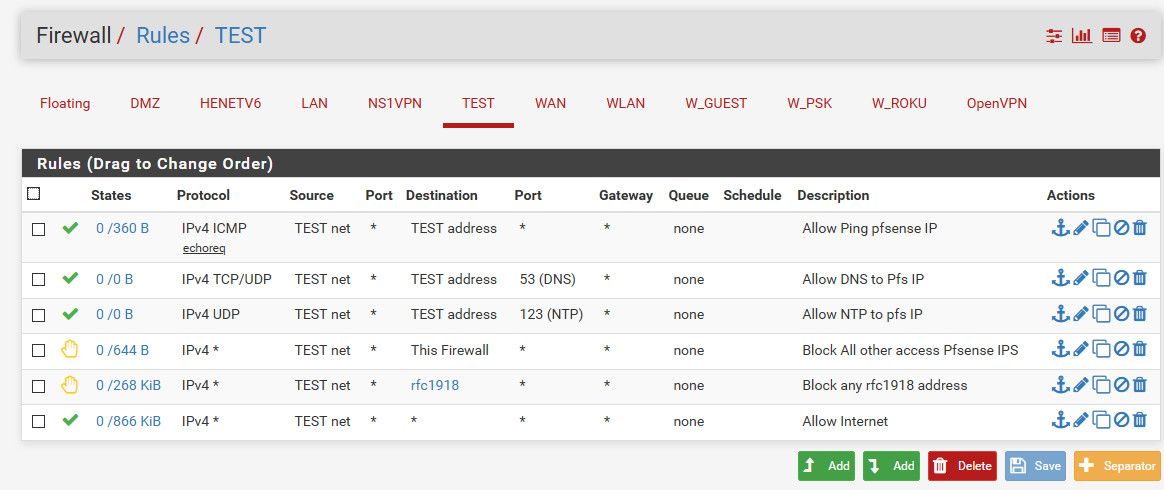
                  You prob want to block "dmz" from talking to the rest of your network, or pfsense gui for example.. Here this would prob be a good example of dmz setup.
                  samplerules.jpg

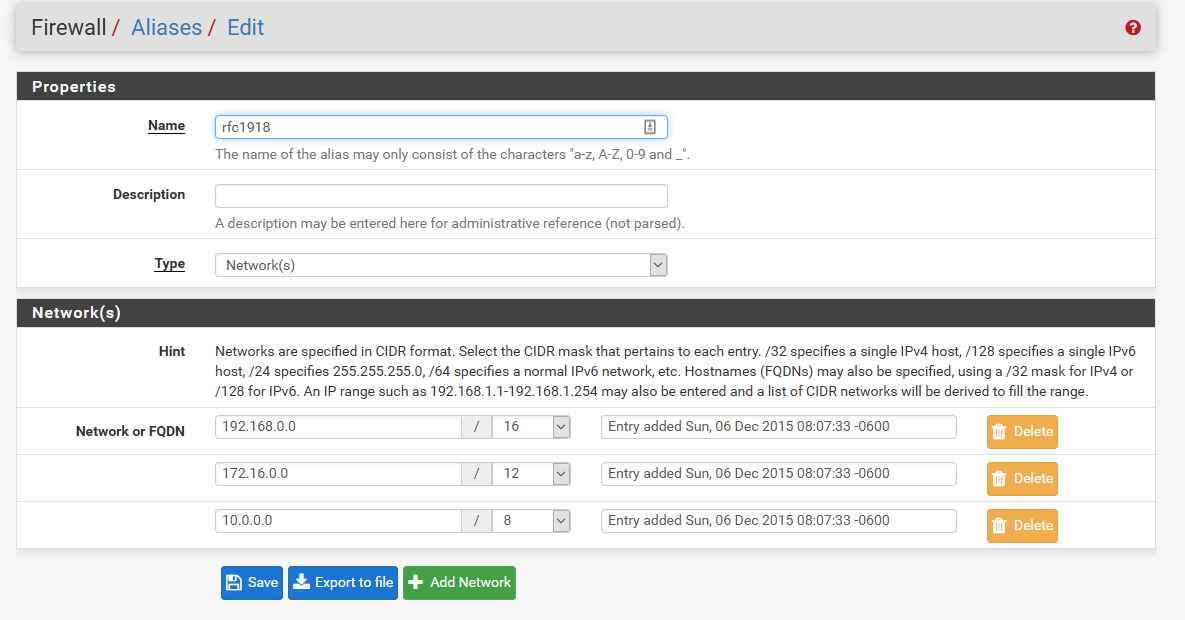
                  If you only have 1 other network you could just use say lan net there for destination, where I have the alias. Or just create an alias that has all the rfc1918 networks in it (10/8,192.168/16,172.16/12)

                  An intelligent man is sometimes forced to be drunk to spend time with his fools
                  If you get confused: Listen to the Music Play
                  Please don't Chat/PM me for help, unless mod related
                  SG-4860 26.07 | Lab VMs 2.9.0, 26.07

                  1 Reply Last reply
                  Reply Quote 0
                  • frogF
                    frog
                    last edited by

                    working now. thx all. Did have an option to blick rfc1918 so just blocked to lan net.
                    Thanks again.

                    chris

                    1 Reply Last reply
                    Reply Quote 0
                    • johnpozJ
                      johnpoz LAYER 8 Global Moderator
                      last edited by johnpoz

                      you would need to create the alias, you could call it whatever you want ;)
                      alias.png

                      Can come in handy if you plan on adding more networks at future date. That you will want to block access too.

                      An intelligent man is sometimes forced to be drunk to spend time with his fools
                      If you get confused: Listen to the Music Play
                      Please don't Chat/PM me for help, unless mod related
                      SG-4860 26.07 | Lab VMs 2.9.0, 26.07

                      1 Reply Last reply
                      Reply Quote 0
                      • JeGrJ
                        JeGr LAYER 8 Moderator @frog
                        last edited by

                        @frog said in DMZ not working:

                        not sure if this should be better.

                        the first rule in your screen made me wonder what you're trying to do. I'd advise to go with John's ruleset. Allow Ping to pfSense from the DMZ, allow DNS, NTP and reject all others. Rejecting "This firewall" is indeed important as it also blocks access via pfSense' WAN IP that otherwise gets overlooked quite often!

                        I'd vote to include the RFC1918 Alias as pfSense default in future releases as it's simply that useful in larger rulesets.

                        Don't forget to upvote 👍 those who kindly offered their time and brainpower to help you!

                        If you're interested, I'm available to discuss details of German-speaking paid support (for companies) if needed.

                        1 Reply Last reply
                        Reply Quote 0
                        • johnpozJ
                          johnpoz LAYER 8 Global Moderator
                          last edited by johnpoz

                          Reject or Block is fine - I use reject on many a local rule that I block, because that way you "know" instantly its blocked because the firewall send you back info - hey your not getting there, go away! ;)

                          Reject on a wan side rule is almost always a very bad idea.. Since you rarely want the firewall to send anything in response.


                          An intelligent man is sometimes forced to be drunk to spend time with his fools
                          If you get confused: Listen to the Music Play
                          Please don't Chat/PM me for help, unless mod related
                          SG-4860 26.07 | Lab VMs 2.9.0, 26.07

                          1 Reply Last reply
                          Reply Quote 0

                          Hello! It looks like you're interested in this conversation, but you don't have an account yet.

                          Getting fed up of having to scroll through the same posts each visit? When you register for an account, you'll always come back to exactly where you were before, and choose to be notified of new replies (either via email, or push notification). You'll also be able to save bookmarks and upvote posts to show your appreciation to other community members.

                          With your input, this post could be even better 💗

                          Register Login
                          • First post
                            Last post
                          Copyright 2026 Rubicon Communications LLC (Netgate). All rights reserved.
                          Privacy Policy · Cookie Policy