Installer fails, reboots PC, and repeat
-
I'm using pfSense-CE-memstick-2.5.2-RELEASE-amd64.img.gz just downloaded today. I flashed it to a USB drive, trying both Rufus AND Etcher, but I still have the same issue. After boot, I see the "Welcome to pfSense" menu and it automatically boots after 3 seconds. It starts to load but then reboots 3-4 seconds later. It simply repeats this cycle, never getting to the installer. I've installed other OSes on the same PC without this issue: CentOS Stream 8, Stream 9, and Debian 11.
I have also tried downloading pfSense-CE-2.5.2-RELEASE-amd64.iso and writing/burning that to a DVD, but that has the same problem.
Just before the PC reboots, I captured the errors in the attached image.
I have also tried to intervene when the "Welcome to pfSense" boot menu appears; I have set "Cons: Video"
(shows "Cons: Serial" by default) as well as attempting to boot in Single user mode. I have also used the Boot Options menu to set Safe Mode: On and Verbose: On, but I see the same result.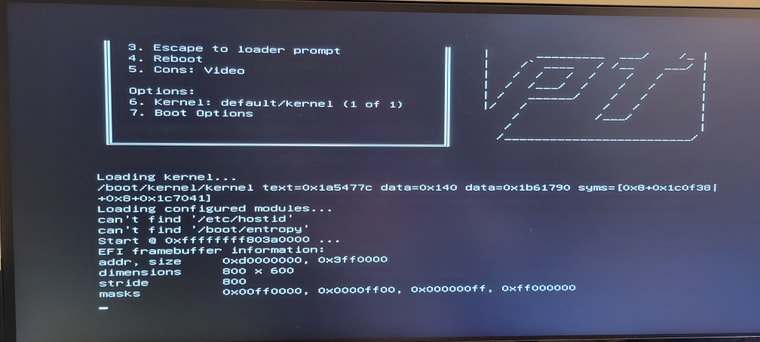
-
@johnnyg_mi said in Installer fails, reboots PC, and repeat:
I'm using pfSense-CE-memstick-2.5.2-RELEASE-amd64.img.gz just downloaded today. I flashed it to a USB drive, trying both Rufus AND Etcher, but I still have the same issue. After boot, I see the "Welcome to pfSense" menu and it automatically boots after 3 seconds. It starts to load but then reboots 3-4 seconds later. It simply repeats this cycle, never getting to the installer. I've installed other OSes on the same PC without this issue: CentOS Stream 8, Stream 9, and Debian 11.
I have also tried downloading pfSense-CE-2.5.2-RELEASE-amd64.iso and writing/burning that to a DVD, but that has the same problem.
Just before the PC reboots, I captured the errors in the attached image.
I have also tried to intervene when the "Welcome to pfSense" boot menu appears; I have set "Cons: Video"
(shows "Cons: Serial" by default) as well as attempting to boot in Single user mode. I have also used the Boot Options menu to set Safe Mode: On and Verbose: On, but I see the same result.See if this thread might help you out: https://forum.netgate.com/topic/161963/boot-from-install-media-results-in-can-t-find-boot-entropy.
Others that have experienced this issue in the past had to change some BIOS settings to get around it. And at least one person I recall reading a post from some time back had to actually update the BIOS in his hardware device.

Hello! It looks like you're interested in this conversation, but you don't have an account yet.
Getting fed up of having to scroll through the same posts each visit? When you register for an account, you'll always come back to exactly where you were before, and choose to be notified of new replies (either via email, or push notification). You'll also be able to save bookmarks and upvote posts to show your appreciation to other community members.
With your input, this post could be even better 💗
Register LoginPrivacy Policy · Cookie Policy