Netgate Discussion Forum
    • Categories
    • Recent
    • Tags
    • Popular
    • Search
    • Register
    • Login
    Introducing Netgate Nexus: Multi-Instance Management at Your Fingertips.

    Exporting Duck DNS Client

    Scheduled Pinned Locked Moved OpenVPN
    13 Posts 5 Posters 3.5k Views 4 Watching
    Loading More Posts
    • Oldest to Newest
    • Newest to Oldest
    • Most Votes
    Reply
    • Reply as topic
    Log in to reply
    This topic has been deleted. Only users with topic management privileges can see it.
    • K
      Kevin 4
      last edited by

      When I set up Duck DNS as a VPN ddns service, the Host Name on the Dynamic DNS Client is blank. Having a blank Host Name prevents me from exporting the Client Config file. I can see the Custom DNS Client in the export list as a blank spot with a check mark, but each time I select it, the client export configuration tool doesn't recognize that anything has been selected for export.
      I'm using the No-IP service, but I would prefer the Duck service as there is no need for monthly email confirmation.

      GertjanG 1 Reply Last reply
      Reply Quote 0
      • GertjanG
        Gertjan @Kevin 4
        last edited by Gertjan

        @kevin-4

        Can't see what you mean ....

        36b4d904-8f09-45ea-b17a-06ac4fb45066-image.png

        "245809" is my HE.net Tunnelbroker Dynamic DNS Client host ID, and has nothing to do with 'dyndns', and I have a RFC2136 home.xxxxxxxxx.fr as a host name for my WAN IPv4, and that's the one I use for my OpenVPN client config files.

        A bank spot or question mark can't be a valid host name for a client VPN config, as something like '?" isn't a host name. So your VPN client won't know where to connect.

        No "help me" PM's please. Use the forum, the community will thank you.

        K 1 Reply Last reply
        Reply Quote 0
        • K
          Kevin 4 @Gertjan
          last edited by

          @gertjan
          I'm referring to when I'm setting up the Dynamic DNS client for the OpenVPN and when I'm trying to export the DNS Client in the OpenVPN export Utility.
          Screen Shot 2023-03-14 at 9.46.59 AM.png
          Screen Shot 2023-03-14 at 9.56.35 AM.png

          GertjanG 1 Reply Last reply
          Reply Quote 0
          • GertjanG
            Gertjan @Kevin 4
            last edited by

            @kevin-4

            Yep, that's strange.

            Normally, what you've set here :
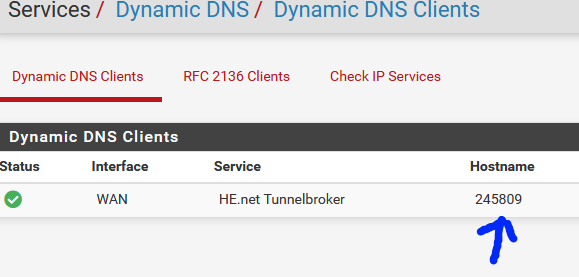
            dcc6c707-34c5-4990-adfa-d49aaa85973d-image.png

            should be shown on the list with available WAN host names under the VPN =>Host Name Resolution

            The same thing goes for the RC2136 - and that's the one I'm using :
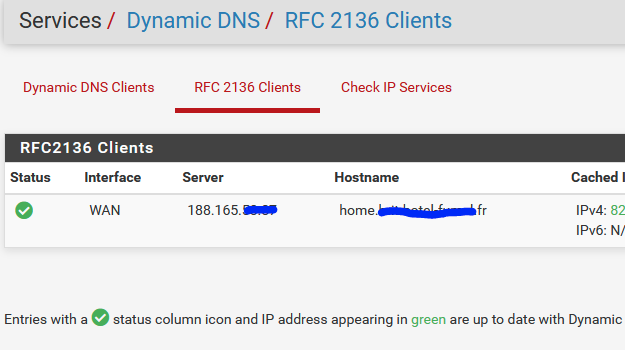
            b2ec3b96-e1c8-445c-a7fa-ff832c2cf860-image.png

            Check your dyndns settings - the host name part.

            It should look like this :

            ac535c6d-39b0-4803-a367-edfa6997799e-image.png

            More info here : OpenVPN Client Export Package

            No "help me" PM's please. Use the forum, the community will thank you.

            K 1 Reply Last reply
            Reply Quote 0
            • K
              Kevin 4 @Gertjan
              last edited by

              @gertjan
              For Duck DNS I'm using Custom, since it isn't in the list. I'm following a Duck DNS process used in pfSense through a YouTube channel, wundertech. Just wondered if anyone else got it working...

              GertjanG 1 Reply Last reply
              Reply Quote 0
              • GertjanG
                Gertjan @Kevin 4
                last edited by

                @kevin-4 said in Exporting Duck DNS Client:

                For Duck DNS I'm using Custom

                Aha.

                No 'host name' field in that custom setup.
                Ok, there is :
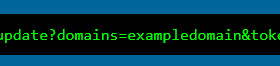
                f2897983-a7eb-4378-a0c4-0797f3c1f31e-image.png

                but the OpenVPN client export can't access that one.
                The host name also exist in your head : that's not accessible neither for the OpenVPN export package ;)

                Use the 'Other' and specify the host name manually :
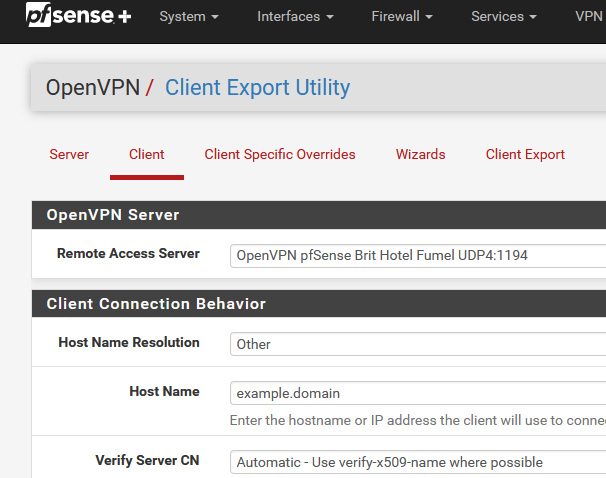
                8a560f8d-8170-49cc-a260-608d6d4dd2a1-image.png

                No "help me" PM's please. Use the forum, the community will thank you.

                K 1 Reply Last reply
                Reply Quote 0
                • K
                  Kevin 4 @Gertjan
                  last edited by

                  @gertjan
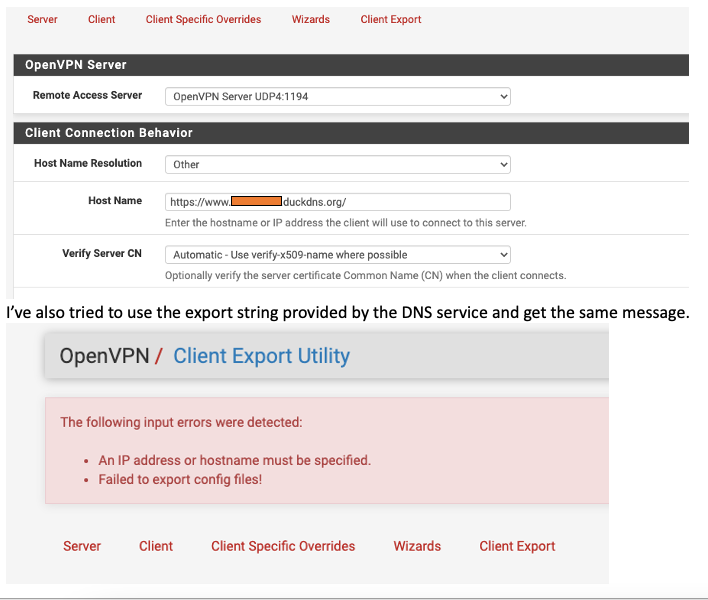
                  I appreciate the advice, I hadn't tried that. Unfortunately, it didn't work either.
                  Screen Shot 2023-03-15 at 10.54.25 AM.png

                  V 1 Reply Last reply
                  Reply Quote 0
                  • V
                    viragomann @Kevin 4
                    last edited by

                    @kevin-4
                    This is an URL, not a host name.
                    Remove the part on front of "www." and the final slash and it should be accepted.

                    K 1 Reply Last reply
                    Reply Quote 0
                    • K
                      Kevin 4 @viragomann
                      last edited by

                      @viragomann
                      Yep, that did it. Thank you!

                      1 Reply Last reply
                      Reply Quote 0
                      • B
                        bdr
                        last edited by bdr

                        I'm using DuckDNS and I ran into the same issue as the OP. When using "Custom" for Dynamic DNS Service Type, there is nowhere to manually enter the hostname. (The hostname is just part of the Update URL string.) As a result, you get what you see here:

                        blank-hostname1.png

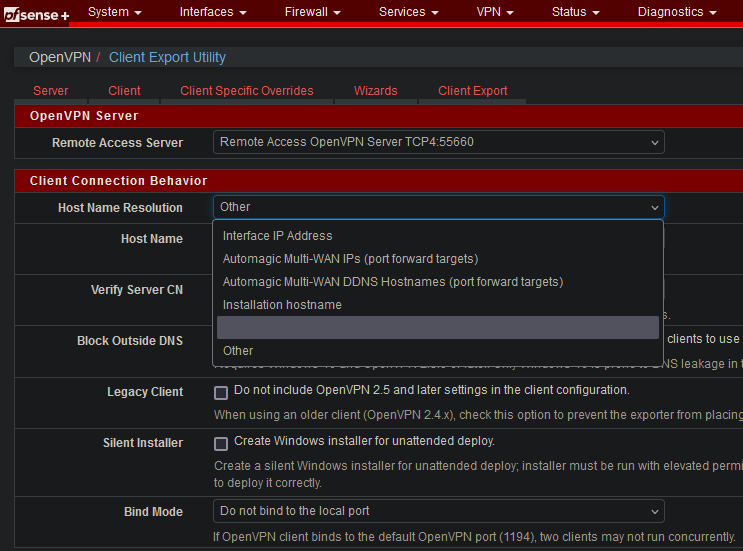
                        After setting up OpenVPN server and configuring users/certificates, on the Client Export Utility page the Host Name Resolution drop-down populates with the Dynamic DNS hostname..... which in this case is just blank:
                        blank-hostname.png

                        As a workaround, I selected "Other" on this page and manually entered my DuckDNS hostname and successfully exported client configurations. Clients can connect to the OpenVPN and everything works perfectly.

                        However, my question is if there are any ramifications or (currently) unseen consequences to this? If something changes with my Dynamic DNS configuration, I suppose I would need to manually make changes in the Client Export Utility? Anything else this might affect?

                        FWIW, this "blank" hostname has been an issue since at least 2015. Any plans to fix/change this?

                        A V 2 Replies Last reply
                        Reply Quote 0
                        • A
                          Antibiotic @bdr
                          last edited by

                          @bdr Is it beta dark theme?

                          pfSense plus 26.03 on Topton mini PC
                          CPU: Intel N100
                          NIC: Intel i-226v 4 pcs
                          RAM : 16 GB DDR5
                          Disk: 128 GB NVMe
                          Brgds, Archi

                          B 1 Reply Last reply
                          Reply Quote 0
                          • V
                            viragomann @bdr
                            last edited by

                            @bdr said in Exporting Duck DNS Client:

                            However, my question is if there are any ramifications or (currently) unseen consequences to this? If something changes with my Dynamic DNS configuration, I suppose I would need to manually make changes in the Client Export Utility? Anything else this might affect?

                            No, the host name is static. Hence as long as it is linked to your public WAN IP, there is nothing to change.

                            Note that host name in the client export utility is used to generate the proper remote line in the client config file. So changes there make only sense if you export the client config and install it on the client again.

                            1 Reply Last reply
                            Reply Quote 1
                            • B
                              bdr @Antibiotic
                              last edited by

                              @Antibiotic Oh, haha.... No, it's actually the "Compact-RED" theme, but with the Dark Reader browser extension enabled.

                              1 Reply Last reply
                              Reply Quote 0

                              Hello! It looks like you're interested in this conversation, but you don't have an account yet.

                              Getting fed up of having to scroll through the same posts each visit? When you register for an account, you'll always come back to exactly where you were before, and choose to be notified of new replies (either via email, or push notification). You'll also be able to save bookmarks and upvote posts to show your appreciation to other community members.

                              With your input, this post could be even better 💗

                              Register Login
                              • First post
                                Last post
                              Copyright 2026 Rubicon Communications LLC (Netgate). All rights reserved.
                              Privacy Policy · Cookie Policy