Netgate Discussion Forum
    • Categories
    • Recent
    • Tags
    • Popular
    • Users
    • Search
    • Register
    • Login
    Introducing Netgate Nexus: Multi-Instance Management at Your Fingertips.

    Netgate 2100 out of space and won't start gui

    Scheduled Pinned Locked Moved General pfSense Questions
    11 Posts 4 Posters 1.7k Views 4 Watching
    Loading More Posts
    • Oldest to Newest
    • Newest to Oldest
    • Most Votes
    Reply
    • Reply as topic
    Log in to reply
    This topic has been deleted. Only users with topic management privileges can see it.
    • A Offline
      applesalwaysred
      last edited by applesalwaysred

      Hi, Netgate 2100 wouldn't boot into gui and says disk full (8gig original). Went into boot environment and space was divided between original and clone. I deleted the clone environment (bectl destroy *). Now message is still no space left. Assistance is appreciated.
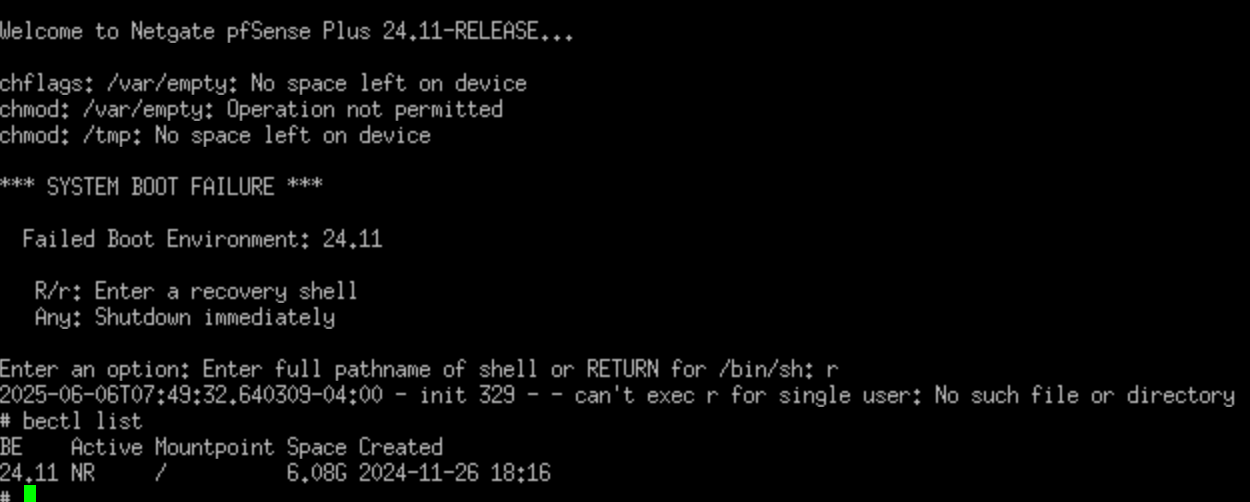
      netgate 2100.png

      SteveITSS 1 Reply Last reply Reply Quote 0
      • SteveITSS Offline
        SteveITS Rebel Alliance @applesalwaysred
        last edited by

        @applesalwaysred what does โ€œdf -hโ€ show?

        Run โ€œdu -hd1 /โ€œ to find the largest directory. Then enter it and repeat.

        Normally deleting a BE would recover quite a bit of space.

        https://docs.netgate.com/pfsense/en/latest/troubleshooting/filesystem-usage.html

        To upgrade, select your branch in System/Update/Update Settings. When upgrading, allow 10-15 minutes to reboot, or more depending on packages, CPU, and/or disk speed.
        Only install packages for your version of pfSense.
        Upvote ๐Ÿ‘ helpful posts!

        A 1 Reply Last reply Reply Quote 0
        • A Offline
          applesalwaysred @SteveITS
          last edited by

          @SteveITS All the sub directories except 'run' are 100%

          SteveITSS 1 Reply Last reply Reply Quote 0
          • SteveITSS Offline
            SteveITS Rebel Alliance @applesalwaysred
            last edited by

            @applesalwaysred du shows a size not a percentage.

            To upgrade, select your branch in System/Update/Update Settings. When upgrading, allow 10-15 minutes to reboot, or more depending on packages, CPU, and/or disk speed.
            Only install packages for your version of pfSense.
            Upvote ๐Ÿ‘ helpful posts!

            A 1 Reply Last reply Reply Quote 0
            • A Offline
              applesalwaysred @SteveITS
              last edited by applesalwaysred

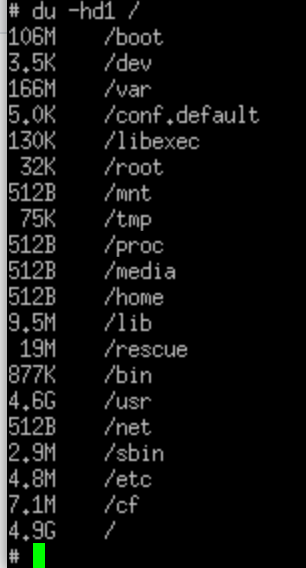
              @SteveITS Went in / and pulled this
              du output.png

              SteveITSS 1 Reply Last reply Reply Quote 0
              • SteveITSS Offline
                SteveITS Rebel Alliance @applesalwaysred
                last edited by

                @applesalwaysred OK, so go into /usr and repeat, until you find the directory with the largest usage, then "ls -l" in it.

                Check /cf/conf/backup and you can delete old backup files if present.

                To upgrade, select your branch in System/Update/Update Settings. When upgrading, allow 10-15 minutes to reboot, or more depending on packages, CPU, and/or disk speed.
                Only install packages for your version of pfSense.
                Upvote ๐Ÿ‘ helpful posts!

                A 1 Reply Last reply Reply Quote 1
                • A Offline
                  applesalwaysred @SteveITS
                  last edited by

                  @SteveITS Found a large dump file and deleted it (I caused it). Device is now working, thanks!

                  JonathanLeeJ 1 Reply Last reply Reply Quote 2
                  • JonathanLeeJ Offline
                    JonathanLee @applesalwaysred
                    last edited by

                    @applesalwaysred why did it have a dump file?

                    Make sure to upvote

                    A 1 Reply Last reply Reply Quote 0
                    • A Offline
                      applesalwaysred @JonathanLee
                      last edited by

                      @JonathanLee I ran ups test from the command prompt resulting in php fail which filled the disk.

                      1 Reply Last reply Reply Quote 0
                      • stephenw10S Offline
                        stephenw10 Netgate Administrator
                        last edited by

                        Ah a core dump. Those can be pretty big.

                        A 1 Reply Last reply Reply Quote 1
                        • A Offline
                          applesalwaysred @stephenw10
                          last edited by

                          @stephenw10 The best of times, the worst of times.

                          1 Reply Last reply Reply Quote 1
                          • First post
                            Last post
                          Copyright 2026 Rubicon Communications LLC (Netgate). All rights reserved.
                          Privacy Policy · Cookie Policy