Fios DHCPv6 Issues
-
I have been going in circles for days trying to get IPV6 to work. IPV4 is working fine, and right now most of my network is just IPV4. Cloudflare has marked every single subnet I've been on with Verizon FIOS for the past year as "abusive" and I've had enough of the 'prove your human' nonsense wasting my time. I'm switching to IPV6 for my public traffic one way or another.
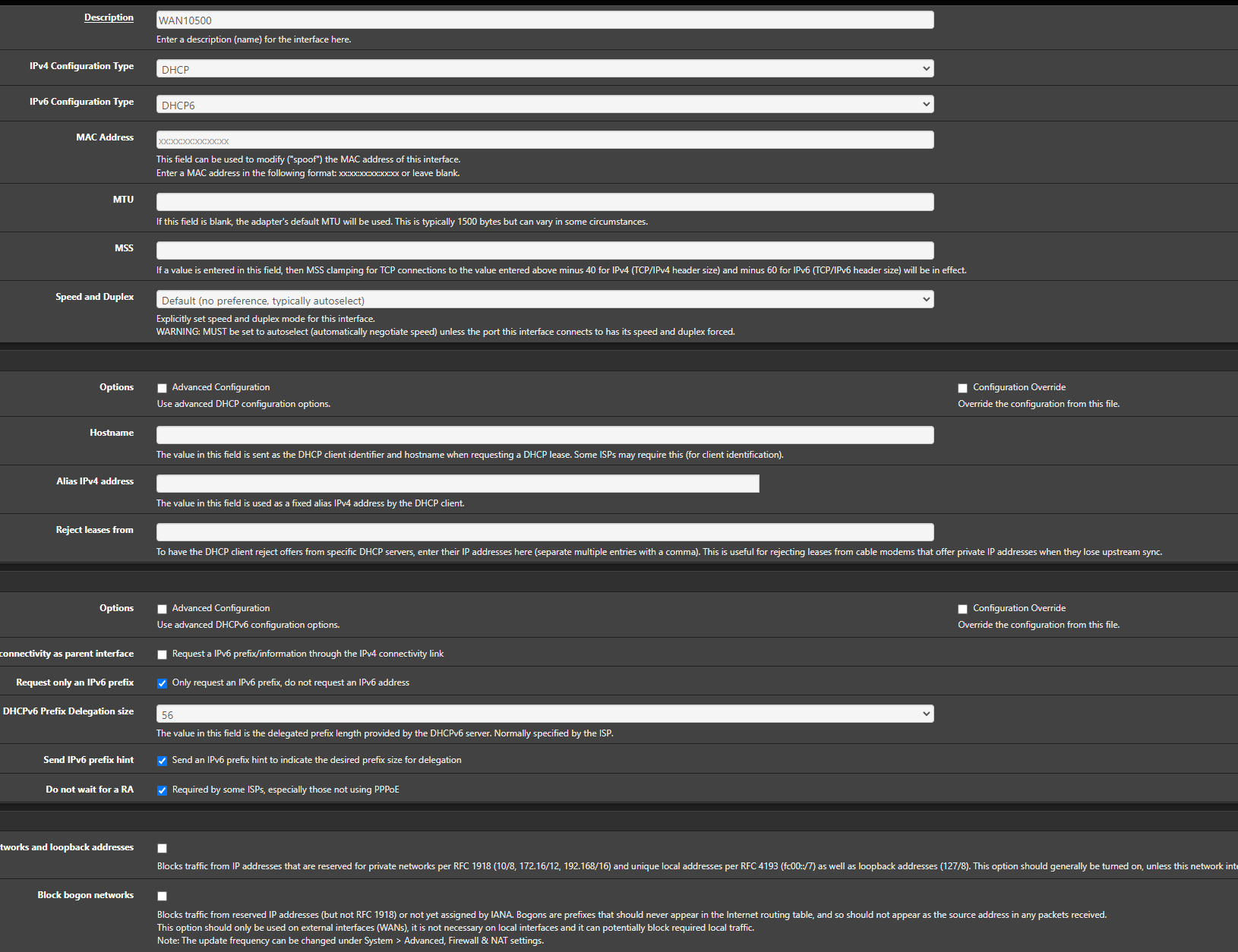
I have tried virtually every possible variation of settings on the WAN interface (ixl3) to get a prefix from FIOS. It looks like in packet captures on the WAN the request is going out and getting the appropriate response from the ISP, and then something happens with
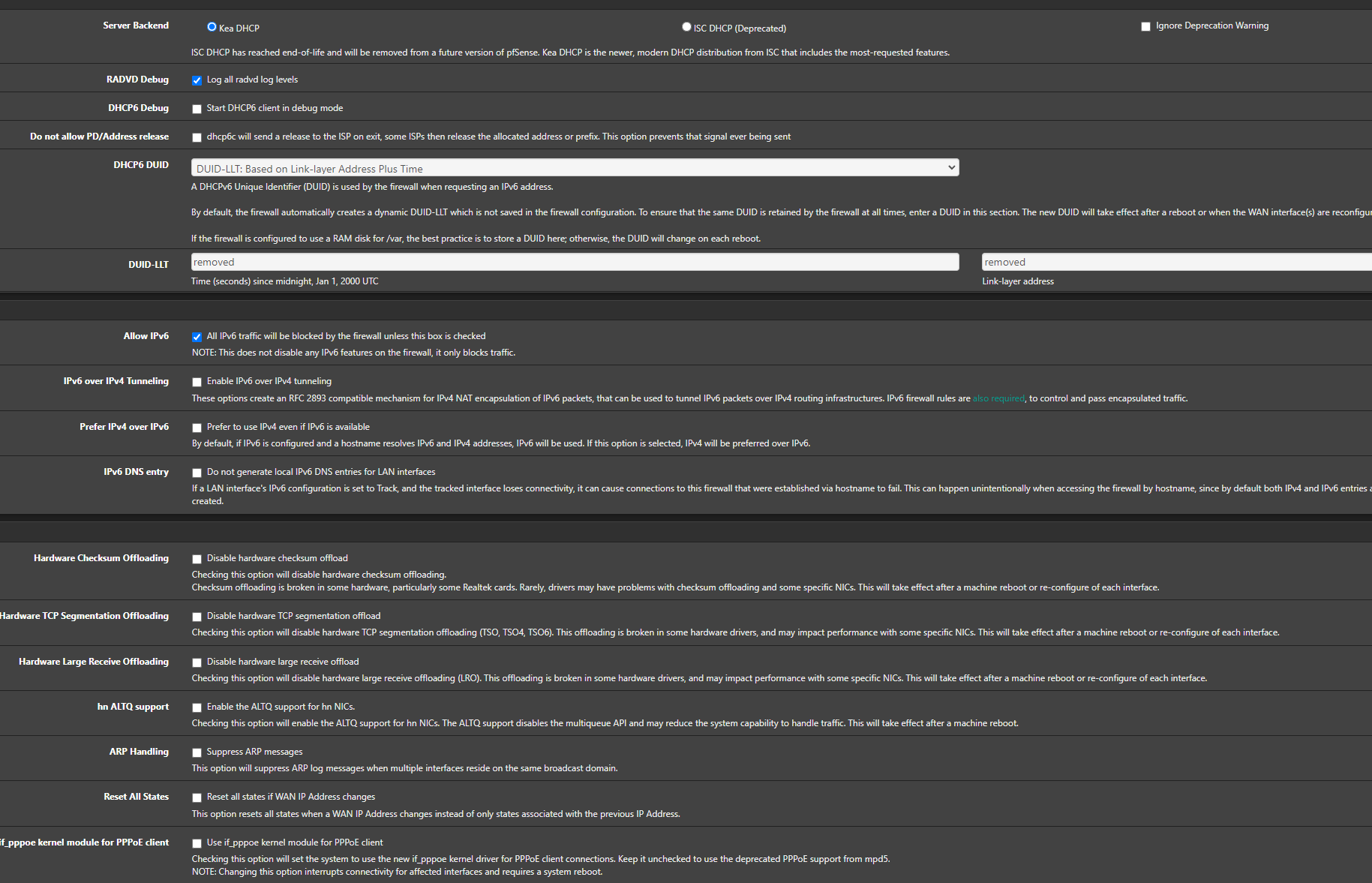
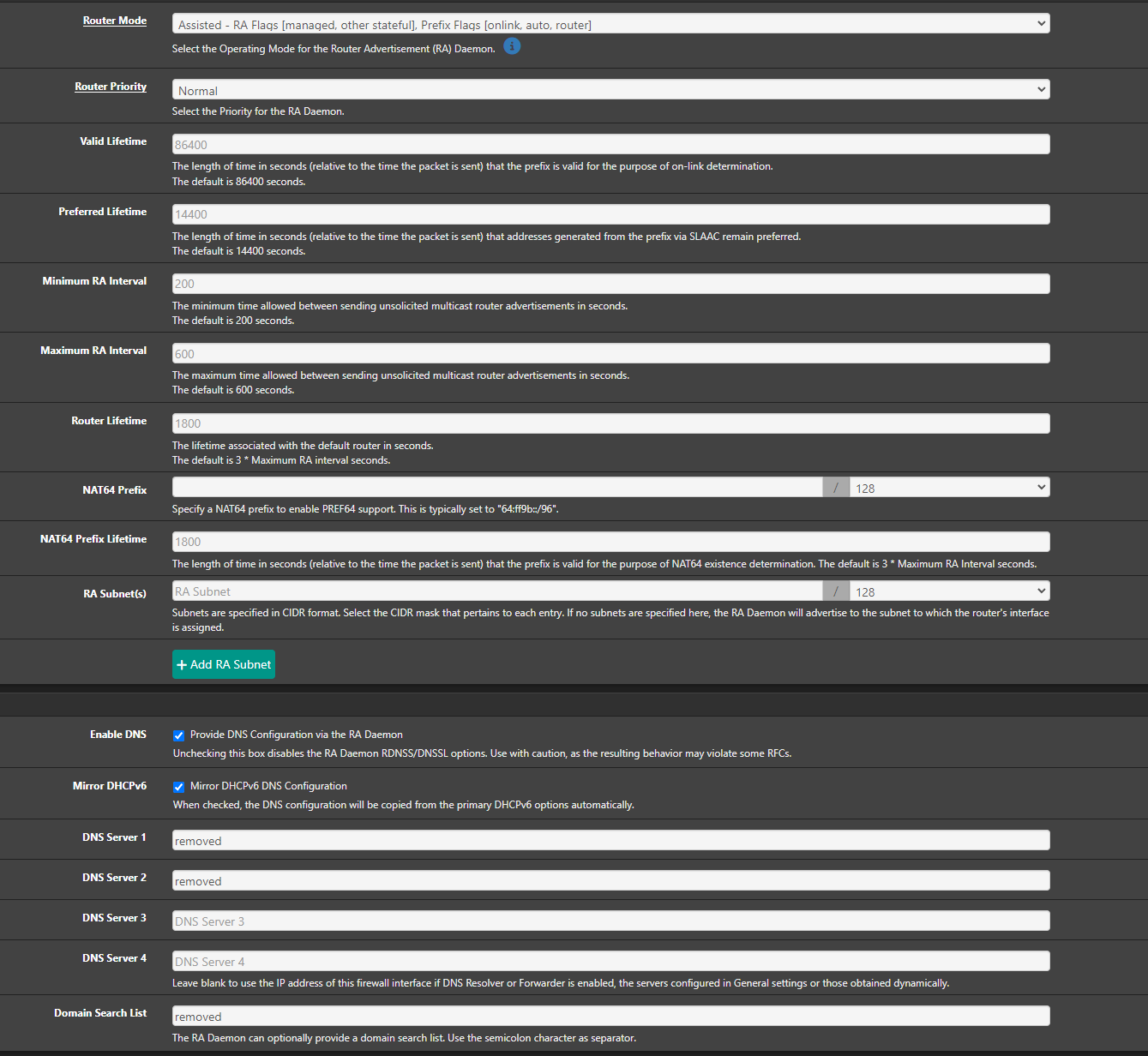
/var/etc/dhcp6c_wan_dhcp6withoutra_script.sh, it's fumbling and dropping the response somehow and starting over. I've confirmed cli that the script is there and verified the contents. The file/usr/local/etc/dhcp6cctlkeyis used by the dhcp6c FreeBSD for control port which is not a feature used by pfsense, at least that's what I was able to find. I've even tried disabling LLDP on the nic, which is a 4 port 10GB Intel X710. I know that for some ISP's having a link local address on the wan is normal (I guess cgnat?) but FIOS I don't think does that, I can see in the DHCPv6 pcap that fios is attempting to assign an IA Prefix assigned with length 56 and prefix address startign with2600:4040:(7200 lifetime). I cannot ping or make any connections over the wan via IPV6 from cli on pfsense while it has a link local address.I've tried configuring the other IPV6 related settings such as router advertisements, dhcpv6, etc, but those should not be affecting the initial step of WAN getting assigned a prefix via DHCPv6. I know that the ix drivers on this version of freebsd are very outdated for the X710 firmware version, but since I see it sending and receiving IPV6 packets on the WAN and successfully acting as a DHCPv6 server on the LAN I do not think this is involved.
Appreciate any insight to the problem, or any additional troubleshooting steps. I am hoping someone sees this and already knows the problem. Thanks.
<31>1 2025-11-18T23:50:36.950229-05:00 [removed] dhcp6c 37885 - - called
<31>1 2025-11-18T23:50:36.950237-05:00 [removed] dhcp6c 37885 - - called
<31>1 2025-11-18T23:50:36.950351-05:00 [removed] dhcp6c 37959 - - reset a timer on ixl3, state=INIT, timeo=0, retrans=891
<30>1 2025-11-18T23:50:37.857531-05:00 [removed] dhcp6c 37959 - - Sending Solicit
<31>1 2025-11-18T23:50:37.857567-05:00 [removed] dhcp6c 37959 - - a new XID (c6762a) is generated
<31>1 2025-11-18T23:50:37.857572-05:00 [removed] dhcp6c 37959 - - set client ID (len 14)
<31>1 2025-11-18T23:50:37.857574-05:00 [removed] dhcp6c 37959 - - set elapsed time (len 2)
<31>1 2025-11-18T23:50:37.857578-05:00 [removed] dhcp6c 37959 - - set option request (len 4)
<31>1 2025-11-18T23:50:37.857582-05:00 [removed] dhcp6c 37959 - - set IA_PD prefix
<31>1 2025-11-18T23:50:37.857584-05:00 [removed] dhcp6c 37959 - - set IA_PD
<31>1 2025-11-18T23:50:37.857711-05:00 [removed] dhcp6c 37959 - - send solicit to ff02::1:2%ixl3
<31>1 2025-11-18T23:50:37.857718-05:00 [removed] dhcp6c 37959 - - reset a timer on ixl3, state=SOLICIT, timeo=0, retrans=1091
<30>1 2025-11-18T23:50:38.955830-05:00 [removed] dhcp6c 37959 - - Sending Solicit
<31>1 2025-11-18T23:50:38.955846-05:00 [removed] dhcp6c 37959 - - set client ID (len 14)
<31>1 2025-11-18T23:50:38.955849-05:00 [removed] dhcp6c 37959 - - set elapsed time (len 2)
<31>1 2025-11-18T23:50:38.955852-05:00 [removed] dhcp6c 37959 - - set option request (len 4)
<31>1 2025-11-18T23:50:38.955855-05:00 [removed] dhcp6c 37959 - - set IA_PD prefix
<31>1 2025-11-18T23:50:38.955857-05:00 [removed] dhcp6c 37959 - - set IA_PD
<31>1 2025-11-18T23:50:38.955963-05:00 [removed] dhcp6c 37959 - - send solicit to ff02::1:2%ixl3
<31>1 2025-11-18T23:50:38.955970-05:00 [removed] dhcp6c 37959 - - reset a timer on ixl3, state=SOLICIT, timeo=1, retrans=2083
<30>1 2025-11-18T23:50:41.043759-05:00 [removed] dhcp6c 37959 - - Sending Solicit
<31>1 2025-11-18T23:50:41.043774-05:00 [removed] dhcp6c 37959 - - set client ID (len 14)
<31>1 2025-11-18T23:50:41.043776-05:00 [removed] dhcp6c 37959 - - set elapsed time (len 2)
<31>1 2025-11-18T23:50:41.043778-05:00 [removed] dhcp6c 37959 - - set option request (len 4)
<31>1 2025-11-18T23:50:41.043781-05:00 [removed] dhcp6c 37959 - - set IA_PD prefix
<31>1 2025-11-18T23:50:41.043783-05:00 [removed] dhcp6c 37959 - - set IA_PD
<31>1 2025-11-18T23:50:41.043853-05:00 [removed] dhcp6c 37959 - - send solicit to ff02::1:2%ixl3
<31>1 2025-11-18T23:50:41.043857-05:00 [removed] dhcp6c 37959 - - reset a timer on ixl3, state=SOLICIT, timeo=2, retrans=3982
<31>1 2025-11-18T23:50:41.146463-05:00 [removed] dhcp6c 37959 - - receive advertise from fe80::f6b5:[removed]:77c2%ixl3 on ixl3
<31>1 2025-11-18T23:50:41.146479-05:00 [removed] dhcp6c 37959 - - get DHCP option client ID, len 14
<31>1 2025-11-18T23:50:41.146485-05:00 [removed] dhcp6c 37959 - - DUID: [removed]
<31>1 2025-11-18T23:50:41.146489-05:00 [removed] dhcp6c 37959 - - get DHCP option server ID, len 26
<31>1 2025-11-18T23:50:41.146494-05:00 [removed] dhcp6c 37959 - - DUID: [removed]
<31>1 2025-11-18T23:50:41.146501-05:00 [removed] dhcp6c 37959 - - get DHCP option IA_PD, len 41
<31>1 2025-11-18T23:50:41.146505-05:00 [removed] dhcp6c 37959 - - IA_PD: ID=0, T1=3600, T2=5760
<31>1 2025-11-18T23:50:41.146507-05:00 [removed] dhcp6c 37959 - - get DHCP option IA_PD prefix, len 25
<31>1 2025-11-18T23:50:41.146511-05:00 [removed] dhcp6c 37959 - - IA_PD prefix: 2600:[removed]::/56 pltime=7200 vltime=16609634390519061536
<31>1 2025-11-18T23:50:41.146518-05:00 [removed] dhcp6c 37959 - - server ID: [removed], pref=-1
<31>1 2025-11-18T23:50:41.146549-05:00 [removed] dhcp6c 37959 - - reset timer for ixl3 to 0.897309
<31>1 2025-11-18T23:50:42.048422-05:00 [removed] dhcp6c 37959 - - picked a server (ID: [removed])
<30>1 2025-11-18T23:50:42.048438-05:00 [removed] dhcp6c 37959 - - Sending Request
<31>1 2025-11-18T23:50:42.048441-05:00 [removed] dhcp6c 37959 - - a new XID (793e40) is generated
<31>1 2025-11-18T23:50:42.048444-05:00 [removed] dhcp6c 37959 - - set client ID (len 14)
<31>1 2025-11-18T23:50:42.048446-05:00 [removed] dhcp6c 37959 - - set server ID (len 26)
<31>1 2025-11-18T23:50:42.048447-05:00 [removed] dhcp6c 37959 - - set elapsed time (len 2)
<31>1 2025-11-18T23:50:42.048449-05:00 [removed] dhcp6c 37959 - - set option request (len 4)
<31>1 2025-11-18T23:50:42.048451-05:00 [removed] dhcp6c 37959 - - set IA_PD prefix
<31>1 2025-11-18T23:50:42.048453-05:00 [removed] dhcp6c 37959 - - set IA_PD
<31>1 2025-11-18T23:50:42.048525-05:00 [removed] dhcp6c 37959 - - send request to ff02::1:2%ixl3
<31>1 2025-11-18T23:50:42.048529-05:00 [removed] dhcp6c 37959 - - reset a timer on ixl3, state=REQUEST, timeo=0, retrans=1025
<31>1 2025-11-18T23:50:42.352694-05:00 [removed] dhcp6c 37959 - - receive reply from fe80::f6b5:[removed]:77c2%ixl3 on ixl3
<31>1 2025-11-18T23:50:42.352705-05:00 [removed] dhcp6c 37959 - - get DHCP option client ID, len 14
<31>1 2025-11-18T23:50:42.352710-05:00 [removed] dhcp6c 37959 - - DUID: [removed]
<31>1 2025-11-18T23:50:42.352712-05:00 [removed] dhcp6c 37959 - - get DHCP option server ID, len 26
<31>1 2025-11-18T23:50:42.352717-05:00 [removed] dhcp6c 37959 - - DUID: [removed]
<31>1 2025-11-18T23:50:42.352719-05:00 [removed] dhcp6c 37959 - - get DHCP option IA_PD, len 41
<31>1 2025-11-18T23:50:42.352722-05:00 [removed] dhcp6c 37959 - - IA_PD: ID=0, T1=3600, T2=5760
<31>1 2025-11-18T23:50:42.352724-05:00 [removed] dhcp6c 37959 - - get DHCP option IA_PD prefix, len 25
<31>1 2025-11-18T23:50:42.352727-05:00 [removed] dhcp6c 37959 - - IA_PD prefix: 2600:[removed]::/56 pltime=7200 vltime=16609634390519061536
<30>1 2025-11-18T23:50:42.352731-05:00 [removed] dhcp6c 37959 - - dhcp6c Received REQUEST
<31>1 2025-11-18T23:50:42.352749-05:00 [removed] dhcp6c 37959 - - make an IA: PD-0
<31>1 2025-11-18T23:50:42.352757-05:00 [removed] dhcp6c 37959 - - create a prefix 2600:[removed]::/56 pltime=7200, vltime=7200
<31>1 2025-11-18T23:50:42.352760-05:00 [removed] dhcp6c 37959 - - executes /var/etc/dhcp6c_wan_dhcp6withoutra_script.sh <13>1 2025-11-18T23:50:42.355072-05:00 [removed] dhcp6c 19467 - - dhcp6c REQUEST on ixl3 - running rtsold
<31>1 2025-11-18T23:50:42.355299-05:00 [removed] dhcp6c 37959 - - script "/var/etc/dhcp6c_wan_dhcp6withoutra_script.sh" terminated
<31>1 2025-11-18T23:50:42.355315-05:00 [removed] dhcp6c 37959 - - removing an event on ixl3, state=REQUEST
<31>1 2025-11-18T23:50:42.355331-05:00 [removed] dhcp6c 37959 - - removing server (ID: [removed])
<31>1 2025-11-18T23:50:42.355338-05:00 [removed] dhcp6c 37959 - - got an expected reply, sleeping.
<30>1 2025-11-18T23:58:27.071327-05:00 [removed] dhcp6c 37959 - - exit without release
<30>1 2025-11-18T23:58:27.071349-05:00 [removed] dhcp6c 37959 - - Bypassing address release because of -n flag
<31>1 2025-11-18T23:58:27.071352-05:00 [removed] dhcp6c 37959 - - remove an IA: PD-0
<31>1 2025-11-18T23:58:27.071358-05:00 [removed] dhcp6c 37959 - - remove a site prefix 2600:[removed]::/56
<31>1 2025-11-18T23:58:27.071363-05:00 [removed] dhcp6c 37959 - - reset a timer on ixl3, state=INIT, timeo=0, retrans=244
<31>1 2025-11-18T23:58:27.071364-05:00 [removed] dhcp6c 37959 - - removing an event on ixl3, state=INIT
<31>1 2025-11-18T23:58:27.071366-05:00 [removed] dhcp6c 37959 - - executes /var/etc/dhcp6c_wan_dhcp6withoutra_script.sh <29>1 2025-11-18T23:58:27.071480-05:00 [removed] dhcp6c 46591 - - lstat failed: No such file or directory <27>1 2025-11-18T23:58:27.071504-05:00 [removed] dhcp6c 46591 - - script "/var/etc/dhcp6c_wan_dhcp6withoutra_script.sh" cannot be executed safely
<31>1 2025-11-18T23:58:27.071578-05:00 [removed] dhcp6c 37959 - - script "/var/etc/dhcp6c_wan_dhcp6withoutra_script.sh" terminated
<30>1 2025-11-18T23:58:27.071587-05:00 [removed] dhcp6c 37959 - - exiting
<31>1 2025-11-18T23:58:40.551718-05:00 [removed] dhcp6c 49254 - - extracted an existing DUID from /var/db/dhcp6c_duid: [removed] <27>1 2025-11-18T23:58:40.551786-05:00 [removed] dhcp6c 49254 - - failed to open /usr/local/etc/dhcp6cctlkey: No such file or directory <29>1 2025-11-18T23:58:40.551788-05:00 [removed] dhcp6c 49254 - - failed initialize control message authentication <29>1 2025-11-18T23:58:40.551810-05:00 [removed] dhcp6c 49254 - - skip opening control port
<31>1 2025-11-18T23:58:40.551902-05:00 [removed] dhcp6c 49254 - - <3>[interface] (9)
<31>1 2025-11-18T23:58:40.551904-05:00 [removed] dhcp6c 49254 - - <5>[ixl3] (4)
<31>1 2025-11-18T23:58:40.551906-05:00 [removed] dhcp6c 49254 - - <3>begin of closure [{] (1)
<31>1 2025-11-18T23:58:40.551908-05:00 [removed] dhcp6c 49254 - - <3>[send] (4)
<31>1 2025-11-18T23:58:40.551910-05:00 [removed] dhcp6c 49254 - - <3>[ia-pd] (5)
<31>1 2025-11-18T23:58:40.551911-05:00 [removed] dhcp6c 49254 - - <3>[0] (1)
<31>1 2025-11-18T23:58:40.551916-05:00 [removed] dhcp6c 49254 - - <3>end of sentence [;] (1)
<31>1 2025-11-18T23:58:40.551918-05:00 [removed] dhcp6c 49254 - - <3>comment [# request prefix delegation] (27)
<31>1 2025-11-18T23:58:40.551920-05:00 [removed] dhcp6c 49254 - - <3>[request] (7)
<31>1 2025-11-18T23:58:40.551921-05:00 [removed] dhcp6c 49254 - - <3>[domain-name-servers] (19)
<31>1 2025-11-18T23:58:40.551923-05:00 [removed] dhcp6c 49254 - - <3>end of sentence [;] (1)
<31>1 2025-11-18T23:58:40.551925-05:00 [removed] dhcp6c 49254 - - <3>[request] (7)
<31>1 2025-11-18T23:58:40.551926-05:00 [removed] dhcp6c 49254 - - <3>[domain-name] (11)
<31>1 2025-11-18T23:58:40.551928-05:00 [removed] dhcp6c 49254 - - <3>end of sentence [;] (1)
<31>1 2025-11-18T23:58:40.551929-05:00 [removed] dhcp6c 49254 - - <3>[script] (6)
<31>1 2025-11-18T23:58:40.551931-05:00 [removed] dhcp6c 49254 - - <3>["/var/etc/dhcp6c_wan_dhcp6withoutra_script.sh"] (46)
<31>1 2025-11-18T23:58:40.551933-05:00 [removed] dhcp6c 49254 - - <3>end of sentence [;] (1)
<31>1 2025-11-18T23:58:40.551935-05:00 [removed] dhcp6c 49254 - - <3>comment [# we'd like nameservers and RTSOLD to do all the work] (53)
<31>1 2025-11-18T23:58:40.551936-05:00 [removed] dhcp6c 49254 - - <3>end of closure [}] (1)
<31>1 2025-11-18T23:58:40.551938-05:00 [removed] dhcp6c 49254 - - <3>end of sentence [;] (1)
<31>1 2025-11-18T23:58:40.551940-05:00 [removed] dhcp6c 49254 - - <3>[id-assoc] (8)
<31>1 2025-11-18T23:58:40.551942-05:00 [removed] dhcp6c 49254 - - <13>[pd] (2)
<31>1 2025-11-18T23:58:40.551944-05:00 [removed] dhcp6c 49254 - - <13>[0] (1)
<31>1 2025-11-18T23:58:40.551945-05:00 [removed] dhcp6c 49254 - - <13>begin of closure [{] (1)
<31>1 2025-11-18T23:58:40.551947-05:00 [removed] dhcp6c 49254 - - <3>[prefix] (6)
<31>1 2025-11-18T23:58:40.551949-05:00 [removed] dhcp6c 49254 - - <3>[::] (2)
<31>1 2025-11-18T23:58:40.551950-05:00 [removed] dhcp6c 49254 - - <3>[/] (1)
<31>1 2025-11-18T23:58:40.551952-05:00 [removed] dhcp6c 49254 - - <3>[56] (2)
<31>1 2025-11-18T23:58:40.551953-05:00 [removed] dhcp6c 49254 - - <3>[infinity] (8)
<31>1 2025-11-18T23:58:40.551955-05:00 [removed] dhcp6c 49254 - - <3>end of sentence [;] (1)
<31>1 2025-11-18T23:58:40.551957-05:00 [removed] dhcp6c 49254 - - <3>end of closure [}] (1)
<31>1 2025-11-18T23:58:40.551959-05:00 [removed] dhcp6c 49254 - - <3>end of sentence [;] (1)
NIC:
ixl3@pci0:1:0:3:        class=0x020000 rev=0x01 hdr=0x00 vendor=0x8086 device=0x1572 subvendor=0x1dcf subdevice=0x0000
    vendor     = 'Intel Corporation'
    device     = 'Ethernet Controller X710 for 10GbE SFP+'
    class      = network
    subclass   = ethernet
    cap 01[40] = powerspec 3  supports D0 D3  current D0
    cap 05[50] = MSI supports 1 message, 64 bit, vector masks
    cap 11[70] = MSI-X supports 129 messages, enabled
                 Table in map 0x1c[0x0], PBA in map 0x1c[0x1000]
    cap 10[a0] = PCI-Express 2 endpoint max data 128(2048) FLR RO
                 max read 512
                 link x8(x8) speed 8.0(8.0) ASPM disabled(L1)
    ecap 0001[100] = AER 2 0 fatal 0 non-fatal 0 corrected
    ecap 0003[140] = Serial 1 [removed]
    ecap 0017[1a0] = TPH Requester 1
    ecap 000d[1b0] = ACS 1 Source Validation unavailable, Translation Blocking unavailable
                     P2P Req Redirect unavailable, P2P Cmpl Redirect unavailable
                     P2P Upstream Forwarding unavailable, P2P Egress Control unavailable
                     P2P Direct Translated unavailable, Enhanced Capability unavailable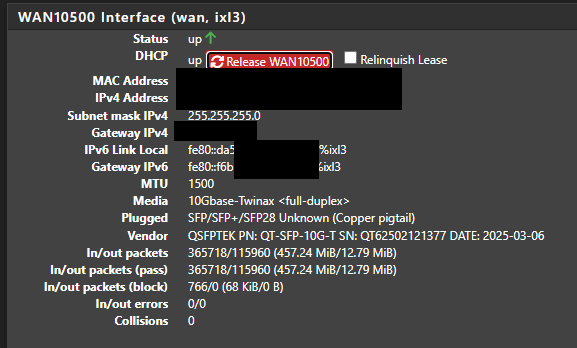

-
@rpm5099 Verizon uses link local when giving you a WAN address. You can try the script by luckman212 from this discussion like I did two days back: [https://forum.netgate.com/topic/190077/verizon-fios-and-ipv6-for-pfsense-2-7-2](link url) [https://github.com/luckman212/assign-gua-from-iapd](link url) which will show an actual IPv6 WAN address in addition to the link local but even when plugging that address in for Dynamic DNS etc it doesn't really work, I suppose the address block is still within the CGNAT.
-
@aivxtla Thanks for your response, but I'm having a hard time understanding how it is possible that pfsense still cannot use IPV6 with one of the largest ISP's in the nation. This patch, while it does assign an address to the WAN does not good because, at least on 2.8.1, the routing is still all screwed up. A half working patch submitted by a user 3 years ago on FreeBSD 13 is not really the answer I was looking for. To even test it I had to fix the path to python, and I still couldn't ping any public IPV6 addresses, it still can't find a route to any public host.
Am I missing something here? Something doesn't seem right about this.
-
@rpm5099 I mean IPv6 works in a sense I can still access IPv6 based sites even without the patch. Just can't use things like Dynamic DNS with IPv6 due the link local address. Hopefully someone else can pitch in.
-
@aivxtla Oh ok - I cannot. I'm using 2.8.1 CE, and even after patching and spending several hours - which required several modifications that wont persist through restoration or get backed up - it didn't matter because the ipv6 routing table was hosed and I couldn't reach any external site at all. I probably could have force it to work, but that should not be necessary.
This reddit post seems relevant, but like everything else I found it's 3 years old. I paid for a pfsense license but stopped using it because of this. So if it's working on the paid version only, I need to look into other options entirely.
Something doesn't seem right about this, IPV6 has been pretty widely adopted. It's a basic working feature in virtually every SoHo router.
-
@rpm5099 said in Fios DHCPv6 Issues:
but I'm having a hard time understanding how it is possible that pfsense still cannot use IPV6 with one of the largest ISP's in the nation.
A couple of points. First off, you don't need a global address on the WAN interface for IPv6 to work, as link local addresses are normally used for routing.
Have you allowed a global address? If you have selected Request only an IPv6 prefix, you will not get a global address.
Why are you worried about this? If to set up a VPN, etc., you can just use the LAN interface address, instead of WAN. If your prefix is virtually static, as mine is, you don't even need dynamic DNS. Any public DNS will work, as I have done here.
BTW, I've had the same prefix for almost 7 years. -
@JKnott I already tried when FIOS first offered IPv6, it does not give a global address even with "Request only an IPv6 prefix" off, granted you can still connect to IPv6 websites with link local, just can't do things like DDNS (I just use IPv4 for that), and no the LAN IPv6 address does not work in this scenario for VPN I tried that a while back without success. Luckmans212's patch seemed to give what appeared to be a global address but it was not routable.
When I was on Comcast you would actually get a global WAN address.
-
@JKnott Hey thanks man, the more I've looked into it I don't think a complete switchover to IPV6 is feasible for how I'm doing things. I was able to get things working by enabling the router advertisements and the dhcp server, as well as the ipv6 default gateway. This served my goal of internet browsing via IPV6, although after opening a private browser on a temporary linux vm and verifying it was using only IPV6 the first site I went to asked me if I was human - it just cannot be any other way.
I'd like to be able to set outbound firewall rules on individual IP's but I think with ipv6 that's going to be more trouble than it's worth. For now I've setup a ULA virtual IP on the pf lan so each of the hosts I want to be able to communicate externally via IPV6 has 3-4 IPV6 addreses: link local, static assigned ULA, a routable IP from the DHCPv6 server from the delegated prefix from FIOS, and I think a SLAAC configured one based on hardware address that is also in the delegated prefix range. Although latter two routable ones are only not colliding due to chance and sheer address space size. This seems to work for what I need it for right now.
I created firewall aliases for those hosts I want to communicate externally via IPV6 with all of their ipv6 addresses and added them to LAN firewall rules allowing them out. I'm never sure which of their addresses they will use, but it seems to mostly be the SLAAC ones. So I was able to make firewall rules to allow those and block outbound IPV6 otherwise. Duplicating the complexity of my outbound per host IPV4/DNS rules for things like ads/youtube/adult blocking does not seem like worth doing with IPV6, although mostly that's based on my fear the the delegated prefix will change and make me redo everything manually again, which I'm obviously not going to do. It would probably be a good idea for pfsense to show somewhere in the gui that a delegated prefix has been assigned and what it is - from what I can tell the only way to see that is to look at the ipv6 routing table command line. Support for GUA RFC 6603 probably isn't a bad idea either.
That's good to know that your prefix hasn't changed in all that time, I'm assuming you are using the LLT method where your DUID is based on MAC and timestamp? If that's the case and they aren't constantly changing then that makes things more feasible. At an enterprise I suppose you pay for a fixed prefix. FIOS changes my IPV4 address constantly when I don't want it to and never when I really want it to.
Thanks for the response. This was more of a pain that I thought it was going to be.
-
@rpm5099 said in Fios DHCPv6 Issues:
I'm assuming you are using the LLT method where your DUID is based on MAC and timestamp?
I don't think the MAC is used. In those 7 years, I've changed both the computer I run pfSense on and my cable modem. Also, when my prefix changed, almost 7 years ago, it was because there was a problem at my ISP that messed up IPv6 for everyone connected to the CMTS I was. In my testing, I had identified the failing CMTS, but it took some effort to get them to fix it.