Can somebody help me get to Yamaha YNCA throug a pfSense?
-
@tinfoilmatt I am aware of that. But it seems like the receiver is trying to contact back on 54230.
@viragomann No, you're right. Only Yamaha does both that and motorcycles.
 I used to have an RD350 two stroke some years ago. And the problem (at least if I understand the packet capture) is not that Hass can't contact the receiver, it's that the receiver can't contact back.
 -
@Mastiff said in Can somebody help me get to Yamaha YNCA throug a pfSense?:
I am aware of that. But it seems like the receiver is trying to contact back on 54230.
You can't be aware of what I said if that's your response. The receiver's 'network stack' is apparently programmed to use a range of TCP source ports (presumably somewhere within, but potentially not exclusive to, a
52[xxx]-54[xxx]range).Stephen's advice already accounted for anything your attempting to address on this specific point by suggesting you use a source port
ANY/*in your "NAT til Yamaha-forsterkere" NAT rule. -
@Mastiff said in Can somebody help me get to Yamaha YNCA throug a pfSense?:
is not that Hass can't contact the receiver, it's that the receiver can't contact back.
If you allow traffic out - the return traffic is always allowed back via the state.
Only time you would need a port forward is if something on your wan was trying to initiate traffic.
That you have stuff on your "wan" is curious - why would your stuff not just be on another segment behind pfsense.
An intelligent man is sometimes forced to be drunk to spend time with his fools
If you get confused: Listen to the Music Play
Please don't Chat/PM me for help, unless mod related
SG-4860 25.07.1 | Lab VMs 2.8.1, 25.07.1 -
Something about using RFC1918 on both the WAN and LAN interfaces may require particular static routing and/or reconfiguration of pfSense settings (e.g.,
Interfaces / WAN / Block private networks and loopback addresses). -
@johnpoz As I said in my first message, this is a pfSense on my "outer" LAN, which is defined as WAN in it, that routes traffic to Home Asistant, and only the traffic I want there. So it's not a real WAN.
@tinfoilmatt I have already removed the tick in "Block private networks". And this one plug-in is the only thing that has problems, MQTT, SCRAPE sensors on port 8880-8889 and about ten other services and maybe 50 devices have no problems getting back and forth. Which is why I am not understanding this at all.
-
@Mastiff Can you show your packet capture settings?
-
And what's your 'outer' firewall/gateway? On the
192.168.1.0/24network I mean. Also pfSense? I think you're going to need a static route configured on whatever that gateway is, directing traffic destined for the192.168.6.0/24subnet to use gateway192.168.1.53.(This topology is terribly designed by the way.)
-
@tinfoilmatt said in Can somebody help me get to Yamaha YNCA throug a pfSense?:
I think you're going to need a static route configured on whatever that gateway is, directing traffic destined for the 192.168.6.0/24 subnet to use gateway 192.168.1.53
Since pfSense is NAT-ing the .6.x traffic to the 192.168.1.x address of pfSense WAN that should not be necessary.
-
@tinfoilmatt I know. So @johnpoz told me in no uncertain terms in 2018, when I built the setup (actually two setups, identical at my summer home and in my house). Four pfSense inside the first pfSense, with heavy use of HA Proxy, doing routing of traffic with different URLs so everything is sendt whereever it has to, no matter if I'm on the network or on a phone network in another place. And yet it has worked close to perfectly, doing exactly what I needed it to do for those seven years, with almost no changes. Just like my boat it's no beauty, but it does the job I need it to do.
Here are the rules for capturing:
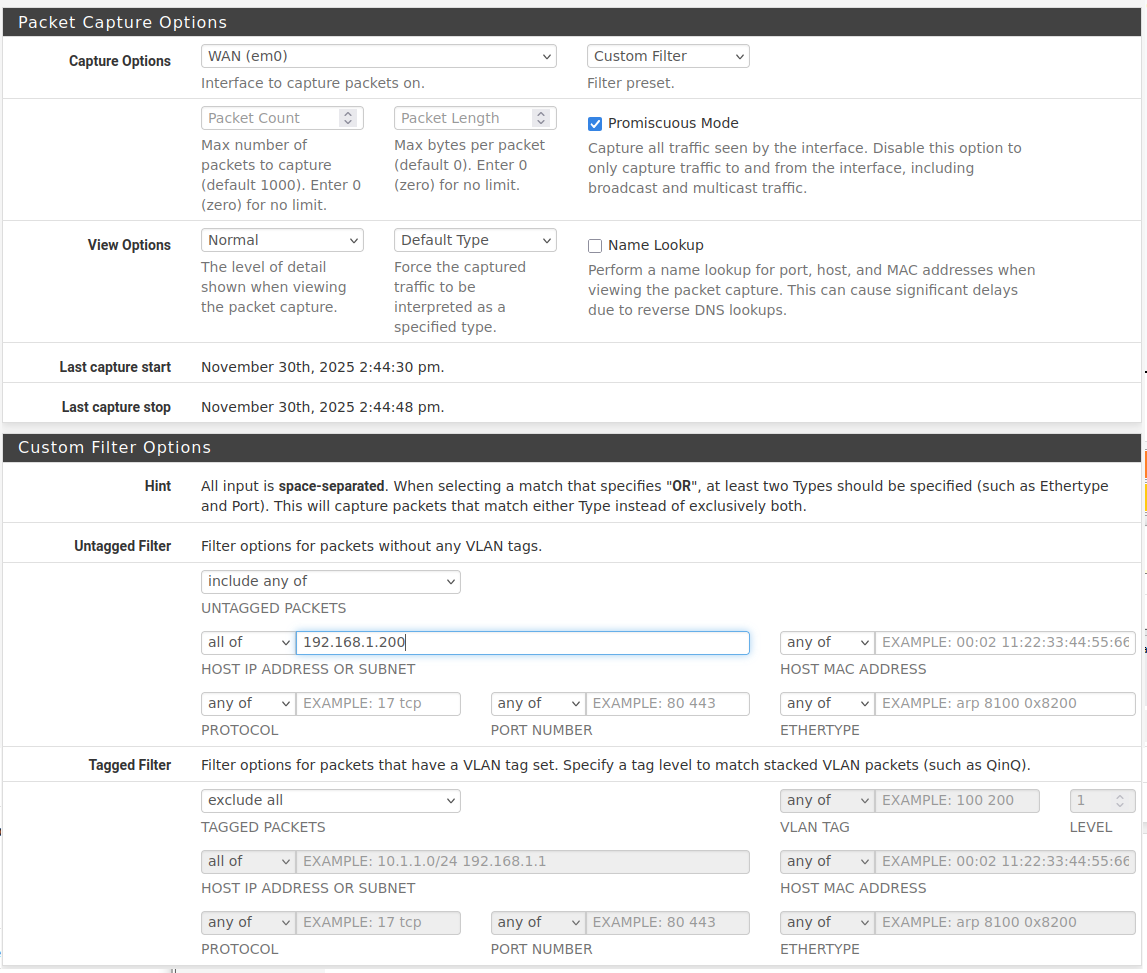
My outer firewall on this system is a Netgate SG-3100 (the other system has a MiniTX with a Intel PCI-E four port network card). Those work as regular firewalls from WAN to LAN. There are normal WANs outside (1 gbit fibre) and normal LANs inside those, and I use the pfSense LAN as WAN for my identical Windows Server 2022 running a bunch of VM's, and some Pi's are outside as well. But if I needed a static route on that, wouldn't I need that for my Pi that up to now has been running this plug-in?
There are no network segments coming into play on this. I have one extra network segment on each place, but they are completely isolated and only used for sharing WAN with neighbours at the summer home and with the rental appartment in the house. They do not have access to anything but the actual WAN.
-
@Mastiff said in Can somebody help me get to Yamaha YNCA throug a pfSense?:
my Pi that up to now has been running this plug-in?
Btw: you could run a
tcpdumpon the Pi to see how the working traffic looks like. And from that it may be possible to figure out the issue.github user graememorgan has a "Yamaha-YNCA-Receivers.pdf" in his repo (together with a short and old Python script). In that (also old) PDF under "2.2.2 Ethernet Port Settings" it mentions:
Default network port number : 50000/TCP
Variable range : 50000 to 65535

Port setting can be changed by YNCA or YNC command only. See 4.2.3 Port Number Change
for details.
You seem to be right about port 50000/tcp.
-
@patient0 The return port from the receiver (1.200) to the Pi (1.101) seems to be varying. I see 43636 on this, I'll try to open for that. Can the receiver be pushing here, so that's why it isn't working?
sudo tcpdump -i eth0 tcp portrange 50000-65535 and src 192.168.1.200
tcpdump: verbose output suppressed, use -v[v]... for full protocol decode
listening on eth0, link-type EN10MB (Ethernet), snapshot length 262144 bytes
17:31:36.686934 IP 192.168.1.200.50000 > 192.168.1.101.43636: Flags [P.], seq 1420605076:1420605101, ack 3707639785, win 3620, options [nop,nop,TS val 2571150897 ecr 903009886], length 25
17:31:54.754639 IP 192.168.1.200.50000 > 192.168.1.101.43636: Flags [P.], seq 25:38, ack 15, win 3620, options [nop,nop,TS val 2571152704 ecr 903027941], length 13
17:31:54.759907 IP 192.168.1.200.50000 > 192.168.1.101.43636: Flags [P.], seq 38:181, ack 15, win 3620, options [nop,nop,TS val 2571152704 ecr 903027956], length 143
17:31:54.763822 IP 192.168.1.200.50000 > 192.168.1.101.43636: Flags [P.], seq 181:290, ack 15, win 3620, options [nop,nop,TS val 2571152705 ecr 903027961], length 109
17:31:59.216182 IP 192.168.1.200.50000 > 192.168.1.101.43636: Flags [P.], seq 290:308, ack 34, win 3620, options [nop,nop,TS val 2571153150 ecr 903032402], length 18
17:31:59.216819 IP 192.168.1.200.50000 > 192.168.1.101.43636: Flags [P.], seq 308:327, ack 34, win 3620, options [nop,nop,TS val 2571153150 ecr 903032417], length 19
17:31:59.829041 IP 192.168.1.200.50000 > 192.168.1.101.43636: Flags [P.], seq 327:355, ack 34, win 3620, options [nop,nop,TS val 2571153211 ecr 903032418], length 28
17:31:59.830096 IP 192.168.1.200.50000 > 192.168.1.101.43636: Flags [P.], seq 355:386, ack 34, win 3620, options [nop,nop,TS val 2571153211 ecr 903033030], length 31
17:31:59.869126 IP 192.168.1.200.50000 > 192.168.1.101.43636: Flags [P.], seq 386:425, ack 34, win 3620, options [nop,nop,TS val 2571153215 ecr 903033031], length 39
17:31:59.870113 IP 192.168.1.200.50000 > 192.168.1.101.43636: Flags [P.], seq 425:456, ack 34, win 3620, options [nop,nop,TS val 2571153215 ecr 903033070], length 31
^C
10 packets captured
10 packets received by filter
0 packets dropped by kernel
sudo tcpdump -i eth0 tcp portrange 50000-65535 and dst 192.168.1.200 tcpdump: verbose output suppressed, use -v[v]... for full protocol decode listening on eth0, link-type EN10MB (Ethernet), snapshot length 262144 bytes 17:33:24.784203 IP 192.168.1.101.43636 > 192.168.1.200.50000: Flags [P.], seq 3707639854:3707639868, ack 1420605582, win 501, options [nop,nop,TS val 903117985 ecr 2571159169], length 14 17:33:24.805569 IP 192.168.1.101.43636 > 192.168.1.200.50000: Flags [.], ack 14, win 501, options [nop,nop,TS val 903118007 ecr 2571161709], length 0 17:33:24.809778 IP 192.168.1.101.43636 > 192.168.1.200.50000: Flags [.], ack 266, win 501, options [nop,nop,TS val 903118011 ecr 2571161709], length 0 17:33:27.204179 IP 192.168.1.101.43636 > 192.168.1.200.50000: Flags [P.], seq 14:33, ack 266, win 501, options [nop,nop,TS val 903120405 ecr 2571161709], length 19 17:33:27.220209 IP 192.168.1.101.43636 > 192.168.1.200.50000: Flags [.], ack 284, win 501, options [nop,nop,TS val 903120421 ecr 2571161950], length 0 17:33:27.220808 IP 192.168.1.101.43636 > 192.168.1.200.50000: Flags [.], ack 303, win 501, options [nop,nop,TS val 903120422 ecr 2571161950], length 0 ^C 6 packets captured 6 packets received by filter 0 packets dropped by kernelEdit: Adding
-
@patient0 said in Can somebody help me get to Yamaha YNCA throug a pfSense?:
Since pfSense is NAT-ing the .6.x traffic to the 192.168.1.x address of pfSense WAN that should not be necessary.
But that doesn't account for the Yamaha receiver's default gateway not being
192.168.1.53. -
@tinfoilmatt Correct, that's 192.168.1.1.
-
@patient0 said in Can somebody help me get to Yamaha YNCA throug a pfSense?:
You seem to be right about port 50000/tcp.
Nobody's contended this point.
-
@Mastiff You need a static route on whatever
192.168.1.1is—again, to route any traffic destined for the192.168.6.0/24subnet to use192.168.1.53as the gateway. -
How else is
192.168.1.1going to know that traffic destined for192.168.6.0/24needs to be routed to another router on its same LAN segment?Phrased another way—how is
192.168.1.1going to know that the192.168.6.0/24network is "directly connected" to another router,192.168.1.53, on its same LAN segment?Another way—how is
192.168.1.1going to know to send traffic destined for192.168.6.0/24somewhere else, as opposed to sending it out the WAN where it routes all other traffic destined for networks it's not attached to? -
@tinfoilmatt Aha, now I think I understand. OK, I'm in static routes, but it seems I need to add a Gateway for that. I'm a bit gunshy of doing that since I have no other way of connecting to my boat and other stuff at my summer home, and my wife has taken the car to visit our daugther. So in case I should lock myself out, I think I'll wait with that until I'm on the inside of that network next weekend. Thanks for the help so far, I will let this lie until Friday or Saturday.
-
@Mastiff said in Can somebody help me get to Yamaha YNCA throug a pfSense?:
I'm in static routes, but it seems I need to add a Gateway for that.
Do it.
Ensure the "
Default gateway" dropdowns are set to something other than "Automatic". -
@tinfoilmatt So then I can't lock myself out? I have chosen WAN_DHCP for IPv4 and None for IPv6, which I don't use.That should be correct? They are the only options before I add a gateway.
Edit: I just remembered that one of the neighbours is at his summer home working, so I can't kill WAN whatever I do. I think I'll go back to plan A and continue this next weekend.
-
@Mastiff said in Can somebody help me get to Yamaha YNCA throug a pfSense?:
The return port from the receiver (1.200) to the Pi (1.101) seems to be varying. I see 43636 on this,
If 1.101 is setting up the TCP connection then it will choose a random port as source port. That as such is normal TCP connection behaviour.
If you access a website, your source port will be random and the destination will be 80/443.And if HA will initiate the communication with the Yamaha receivers then it's like talking to a website and no route is needed anywhere.
But if the receivers also are trying to initiate a connection to HA then it would have to know how to get to it via 1.53.Addition: but reading through the Python YNCA code github: mvdwetering ynca Python module it really seems to be just a tcp connection to port 50000 (per default). And then a serial protocol over tcp.