Using DDNS to access NAS within LAN
-
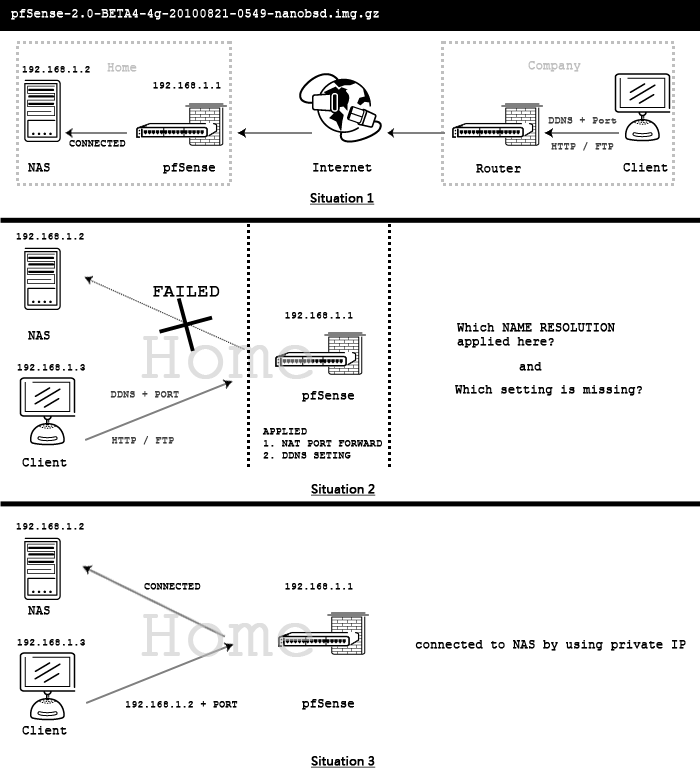
I had setup the DDNS and port forward on my i386 pfSense, so I can access my NAS(Web Server/ FTP server) at office.
I cannot not use DDNS to access my NAS when I am home neverthless.
Then, I try to access the NAS via private IP. It's work.When I am using pfSense embedded 1.2.2, I beat it by setting up a DNS forwarder, but I know it is not for good.
Since it only applied on 1 Web Server and/or 1 FTP server. (Maybe I am wrong.)Sorry for my English.
Below is the imagination on my mind.

-
NAT Reflection is disabled.
The setting is under Advanced settings. Just uncheck the box and save.
-
Thanks Tommy ;D
-
-
I need to check that when I am home.
But really want to thank s for your reply :) -
It's seem not working.
I tried enable the NAT reflection on the rule and Advanced Setting.Then, I check the system logs(All tab) to see if I could get something, but I got nothing.
Are there any other logs I could check? ??? -
Finally, I found some useful logs.
Then I keep trying to work on it. I know there are two ways to enable NAT reflection. Once is on System > Advanced, another is enable it on the rule
1. I uncheck "disable the NAT reflection blablabla" from System > Advanced
After checking the system log and found the errors messages said port range > 500.
I remember I have 1 rule(FTP Passive mode) against to this, but wondering the reason why there are 3 logs prompt about it. It is just minor issue.2. I thought I know the issue and I keep the "disable NAT reflection blablabla" uncheck and only apply the NAT reflection on the rule I want.
I still cannot access the NAS website via DDNS.
3. This time I check the "disable NAT reflection blablabla" and just disable the NAT reflection FTP Passive Mode.
same result.
Although I may wrong, I think that two methods of enable NAT reflection having special relation. Either "AND gate" like relation, or Hierarchy

-
Reset your states after you enable NAT reflection or reboot.
-
What port forward rule is using that many ports? If it is for your NAS, is there any way you can reduce the size of the port range it uses?
-
Thanks for reply.
It wasn't fix after reboot the router.
–---The port forward range is default value of the NAS FTP passive mode and I know the way to limit it within size 500.
If i have a rule which port range > 500 and do not enable NAT reflection (within this rule), will it against NAT reflection(System > Advanced) from enable? -
How about just going to services_dnsmasq.php (DNS Forwarder) in pfsense and create a static entry for the NAS using its local IP address. This will override any other DNS entry for that host.
-
Is DNS forwarder only woking on IP?
I have 2 NAS with ftp/Web server now.
Hello! It looks like you're interested in this conversation, but you don't have an account yet.
Getting fed up of having to scroll through the same posts each visit? When you register for an account, you'll always come back to exactly where you were before, and choose to be notified of new replies (either via email, or push notification). You'll also be able to save bookmarks and upvote posts to show your appreciation to other community members.
With your input, this post could be even better 💗
Register LoginPrivacy Policy · Cookie Policy