• Do we have/will get something similar for Netgate appliances?

    19
    0 Votes
    19 Posts
    1k Views
    J
    @johnpoz Again, who cares what it looks like. And as I said, it's not a travel router. Just a really good piece of equipment. And no, I don't think it looks bad anyway.
  • Netgate 1537, connection craps out after 5 minutes.

    5
    0 Votes
    5 Posts
    405 Views
    N
    @tinfoilmatt Hello, I understand... my previous (was running just fine until last week config) has not been loaded to the Netgate 1537. The device is currently configured with the most basic WAN settings (DHCP) and LAN settings (DHCP) with all other settings at default. I remembered that once upon a time I had hardware lag issues that manifested as high ping times that eventually became timeouts. Which I was able to troubleshoot using an HP diagnostic tool. There is a Supermicro diagnostic tool, which is obtainable from them: SuperDiag_1.11.0_20251106_For_X86. A short test, showed that the SSD failed. Just ran a "full" test targeting the storage device in the hope that I might get a more specific error. Failed again, error remains: SSD Drive Self-test error detected. Code: 20420806 I guess I need a new SSD, before continuing
  • Watchguard XTM 5 Series

    1k
    0 Votes
    1k Posts
    3m Views
    stephenw10S
    Ha, that would do it!
  • Hardware requirements for 10Gb/s WAN

    10
    0 Votes
    10 Posts
    6k Views
    Z
    @stephenw10 said in Hardware requirements for 10Gb/s WAN: Yes, I would expect to see 3-4Gbps from a C2758 with firewall and NAT. There are many variables of course. In case you appreciate having closure as much as I do, your estimate was spot-on; I get about 3.5Gb/s
  • E610-XT2

    14
    0 Votes
    14 Posts
    6k Views
    J
    @stephenw10 Thank you. If I choose the X550-T2, I will go back to the thread on it in which you contributed a lot of information to review.
  • 0 Votes
    4 Posts
    2k Views
    P
    @bradsm87 Just adding that all these sorts of network appliances from China are just not optimised or supporting the Intel SoC package power management, I presume because they have cheapened out on the DC power rails, they seem to use fewer which I suspect stops the Intel SoC from powering down parts of the package or prevents lowering voltages. I have an older fanless network appliance based on a i7 7500U, quite an old chip, this sips 4 watts at idle with three active Ethernet connections, and now we are in winter and the room is cool, its actually cold to the touch the case. Can I find anything using newer SoCs from China that will use less than 10 watt at idle (which even then requires a lot of messing around or even hacking the BIOS to get to 10 watt), no. Even Protectli who charge a premium (probably just to cover the tooling for their bespoke cases), who source from Yanling in China have the same high power consumption issues. My laptop with LCD screen on a low setting will idle at 6 watts at the windows desktop, and LCD turned off will drop to 3-4 watts, the exact same SoC with the same amount of memory and SSD in a Protectli appliance idles at 14 to 16 watt. It has no screen, no keyboard, no audio, no Wi-Fi, no memory card reader or web cam, but still is at wattages in the mid teens. The only manufacturer that seems to buck the trend is Odroid with their H4 boards using Intel SoCs like the N305, where they boast headless figures of less than 3 watt, so they design and implement the SoC correctly. China factories, well they just happy sending out space heaters as they aren't paying our electricity bills.
  • pfsense and Riverbed CX-780

    22
    1
    1 Votes
    22 Posts
    3k Views
    K
    @Canuckfire I bought a CX580 (D-1513N) from ebay a few days ago and was able to use an NVMe SSD by changing the PCH M2 Slot 2 option. The SSD model is Samsung PM981a 256GB, installed in the bottom slot, and lspci reports it as PCIe 3.0 x2. However, changing this option causes the system to hang for about two minutes at POST code 92 (related to PCIe). I'm not sure what the exact cause is. (Aside from the longer boot time, everything else works fine.) [image: 1765847752351-screenshot-2025-12-16-at-10.14.12.png] The port indicated is functioning as an NVMe port. [image: 1765847823559-screenshot-2025-12-12-192123.png] [image: 1765848067720-screenshot-2025-12-16-at-10.20.48.png] klayf@klayf-cx580-01:~$ tail -n +1 /sys/bus/pci/slots/*/*bus_speed ==> /sys/bus/pci/slots/0-1/cur_bus_speed <== 2.5 GT/s PCIe ==> /sys/bus/pci/slots/0-1/max_bus_speed <== 2.5 GT/s PCIe ==> /sys/bus/pci/slots/0-2/cur_bus_speed <== 2.5 GT/s PCIe ==> /sys/bus/pci/slots/0-2/max_bus_speed <== 2.5 GT/s PCIe ==> /sys/bus/pci/slots/0-3/cur_bus_speed <== 5.0 GT/s PCIe ==> /sys/bus/pci/slots/0-3/max_bus_speed <== 8.0 GT/s PCIe ==> /sys/bus/pci/slots/0-4/cur_bus_speed <== 8.0 GT/s PCIe ==> /sys/bus/pci/slots/0-4/max_bus_speed <== 8.0 GT/s PCIe ==> /sys/bus/pci/slots/0-5/cur_bus_speed <== 2.5 GT/s PCIe ==> /sys/bus/pci/slots/0-5/max_bus_speed <== 8.0 GT/s PCIe ==> /sys/bus/pci/slots/0/cur_bus_speed <== 2.5 GT/s PCIe ==> /sys/bus/pci/slots/0/max_bus_speed <== 2.5 GT/s PCIe ==> /sys/bus/pci/slots/1/cur_bus_speed <== 5.0 GT/s PCIe ==> /sys/bus/pci/slots/1/max_bus_speed <== 8.0 GT/s PCIe ==> /sys/bus/pci/slots/2/cur_bus_speed <== 2.5 GT/s PCIe ==> /sys/bus/pci/slots/2/max_bus_speed <== 8.0 GT/s PCIe
  • Mixing different NIC Speeds (1Gb & 10Gb) Performance Problem Question

    175
    0 Votes
    175 Posts
    57k Views
    L
    @ngr2001 Because 802.3x FC is L2 and a crude method. Cisco wants you to use TCP FC and QoS. This is only an issue with DOCSIS internet.
  • Interface errors, missed packets and rec overruns

    18
    0 Votes
    18 Posts
    2k Views
    G
    Well that's interesting. dev.em.5.iflib.rxq0.rxq_fl0.buf_size: 2048 dev.em.5.iflib.rxq0.rxq_fl0.credits: 2047 Doubling the descriptors changed the "credits", not the buffer size. 1023 => 2047.
  • 4200 Port configuration

    7
    0 Votes
    7 Posts
    890 Views
    stephenw10S
    Well you can bridge them. But I wouldn't recommend it!
  • HUNSN RJ46, 6 x 2.5GbE I226-V - VLAN problem

    12
    0 Votes
    12 Posts
    3k Views
    G
    @w0w Wasn't enough for me on v8 though. I had to turn off HW Offload as well... And I have never set interfaces to VLAN aware before on any of my other Proxmox machines (including one with version 9). But this is the only one I have with i226's... and the only one where I run my NICs virtualized for the firewall...
  • Can a i5 2500 route 10 gig?

    3
    0 Votes
    3 Posts
    480 Views
    W
    @stephenw10 Thanks, I will give it a try and see what happens.
  • Hardware Recommendations for 2G Fiber Connection

    5
    0 Votes
    5 Posts
    866 Views
    stephenw10S
    @guardian said in Hardware Recommendations for 2G Fiber Connection: Do you know if there were decent work arounds or if the hardware is just junk? In one thread users flashed an unlocked BIOS to access and change the thermal/power config to something rational. I wasn't involved directly.
  • Question on how much VPN traffic a current N100 cpu can handle

    3
    0 Votes
    3 Posts
    789 Views
    stephenw10S
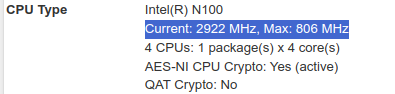
    I would also watch out for the N100 running at some reduced speed. A lot of those Chinese boxes seem to ship with some untuned BIOS values resulting in less than optimal performance. There are a few threads here detailing users attempts to correct it.
  • Netgate 4200 firmware / bios , how to know if one is available? a

    2
    0 Votes
    2 Posts
    213 Views
    No one has replied
  • Storage for SG-4860

    3
    0 Votes
    3 Posts
    516 Views
    T
    @Ramosel Pretty much any 128GB mSATA drive from amazon will do the trick. Some are around $20.00US. Ted
  • Steelhead CX770 Port issues

    21
    0 Votes
    21 Posts
    3k Views
    martimunM
    Looks like all is in good shape. I rebuilt the firewall and all ports are fully functional. I also re-checked all the BIOS settings. Everything looks good as long as the bypass interfaces are set to "No Bypass" in the BIOS. The good thing about the CX770s is that the bypass control is in the BIOS. So far performance is perfect! Looking forward to many years out of my modest investment on these CX770 devices. For anyone interested in these devices, they can be purchased on eBay for around $70-$100. I would like to thank Stephen for all the assistance and input. This one soldier is an incredibly happy customer! Martin M. Mune US Army Combat Veteran Operation Iraqi Freedom Volunteer Soldier International Legion for the Defense of Ukraine Слава Україні! Героям Слава!
  • Topton N100 Reporting 402 MHz

    161
    1
    0 Votes
    161 Posts
    74k Views
    C
    In the end I didnt flash. I dont have the low clock speed issue. I also have a different board layout to the screenshots posted on the other forum, so I think my board revision is different, the bios may still be compatible but given I dont have the locked low clocked speeds, it would mostly be a "nice to have" thing for me rather than a necessity.
  • pfSense on ASUS NUC with a NIC External PCIe Expansion Chassis

    3
    0 Votes
    3 Posts
    610 Views
    N
    @NC1 This would be for home use, not infrastructure as it applies to Enterprise environments. It seems a 40Gbps bus would be plenty fast though for a 1Gb service from your local internet provider. Anyway... I don't know which drivers would be needed which is why I was asking if anyone has ever tried it or thought about it. Maybe someone would have some insight as to the pros and cons. I did see the price tag. I was merely trying to give an example of an external chassis a NIC card could be used in. As a side, I typically future proof my home builds to at least a minimum of 5 years if I can. In a configuration such as this, I could repurpose the NUC for some other future project and plug the external chassis with the NIC card into a different computer. Just a thought.
  • pfSense on Sophos XG125w - "no carrier" on all eth interfaces

    Moved
    29
    4
    0 Votes
    29 Posts
    10k Views
    G
    Hello! I know this post is a while old, but others may experience the same issue. I have an XG125 appliance and had the same problem. How did I solve it? The appliance has 8 ports, and pfSense detects them all, but the ports are reversed in relation to the silkscreen numbers. Here is a list of ports: ibg0 = port 5 ibg1 = port 6 ibg2 = port 7 ibg3 = port 8 ibg4 = port 1 ibg5 = port 2 ibg6 = port 3 ibg7 = port 4
Copyright 2026 Rubicon Communications LLC (Netgate). All rights reserved.