Netgate Discussion Forum
    • Categories
    • Recent
    • Tags
    • Popular
    • Search
    • Register
    • Login
    Introducing Netgate Nexus: Multi-Instance Management at Your Fingertips.

    can't reach my access points on my lan side using openVPN

    Scheduled Pinned Locked Moved Off-Topic & Non-Support Discussion
    12 Posts 5 Posters 2.5k Views 4 Watching
    Loading More Posts
    • Oldest to Newest
    • Newest to Oldest
    • Most Votes
    Reply
    • Reply as topic
    Log in to reply
    This topic has been deleted. Only users with topic management privileges can see it.
    • T
      tripplex95
      last edited by tripplex95

      I am using openvpn enable inter client communication and also used advance config to push static routes and it didin't work still wasn't able to connect to access points. In addition I enabled pushed all generated traffic through the tunnel, which also didn't work.
      Lan ip 192.168.1.1/24
      openVPN tunnel network: 192.168.100.0/24; I have changed this ip multiple times to different classes from A right to C and it still didn't work.
      Pfsense version 2.4.4 64bit

      ---What works--
      I am able to reach the firewall by its lan ip when openVPN enabled.

      1 Reply Last reply
      Reply Quote 0
      • A
        Asamat Global Moderator
        last edited by

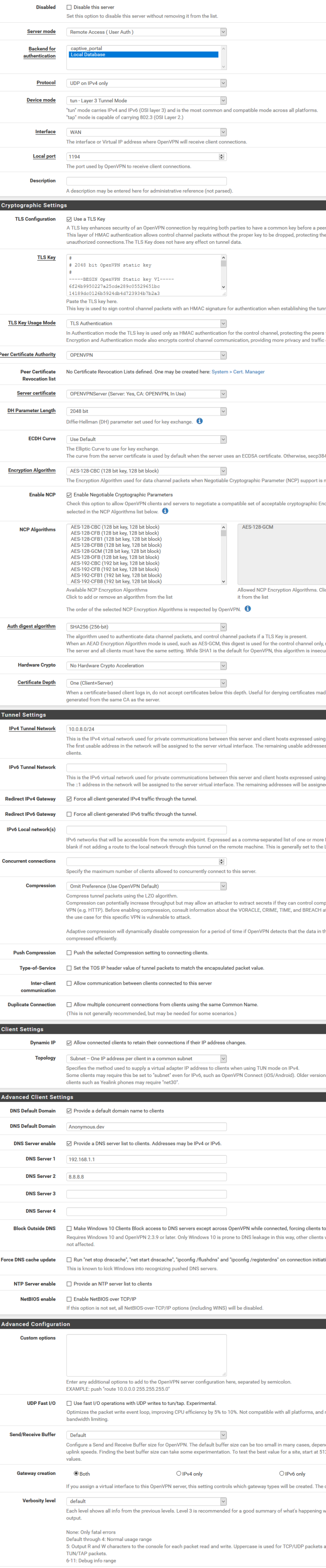
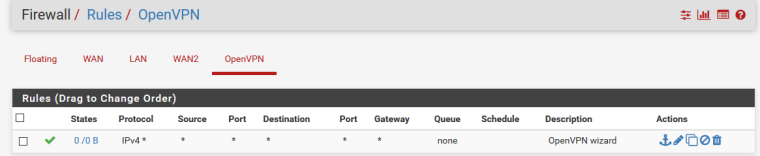
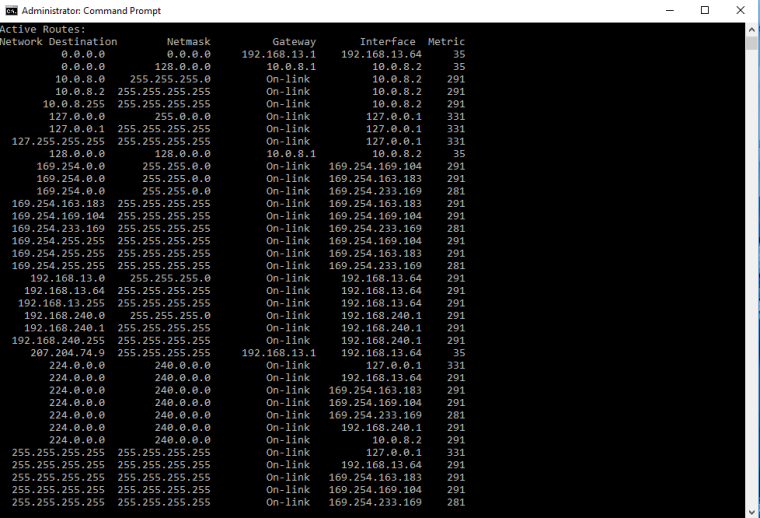
        Can you attach screenshots of

        • OpenVPN server config
        • Firewall Rules for OpenVPN
        • route table from OpenVPN client when it has OpenVPN up
        1 Reply Last reply
        Reply Quote 0
        • T
          tripplex95
          last edited by

          0_1541318488851_Screenshot_2018-11-04 Anonymous Anonymous dev - VPN OpenVPN Servers Edit.png 0_1541318546703_Screenshot_2018-11-04 Anonymous Anonymous dev - Firewall Rules OpenVPN.png 0_1541319399920_routes.png

          1 Reply Last reply
          Reply Quote 0
          • A
            Asamat Global Moderator
            last edited by

            I see no traffic on OpenVPN tunnel. Can you try to use Packet Capture (Diagnostics/Packet Capture) to check if there are any incoming packets in tunnel?

            • Interface: OpenVPN
            • promiscuous mode enabled
            • start
              Capture traffic for a while (2-3 minutes) then Stop and check.
            1 Reply Last reply
            Reply Quote 0
            • A
              Asamat Global Moderator
              last edited by

              @tripplex95 said in can't reach my access points on my lan side using openVPN:

              I am able to reach the firewall by its lan ip when openVPN enabled.

              Sorry, I only now saw this comment - if you can reach LAN IP but can't reach any host behind LAN - you need to check route table on hosts behind LAN.
              And if you try Packet Capture on LAN I think you will see output packets from your Remote host but no replies from hosts on LAN (and it's definitely problem with route table on these hosts)

              1 Reply Last reply
              Reply Quote 0
              • chpalmerC
                chpalmer
                last edited by

                You can reach the LAN address of the firewall from one of the OpenVPN clients?

                Can you show your OpenVPN firewall rules? Set to LAN net and not LAN address right?

                Triggering snowflakes one by one..
                Primary- Intel(R) Pentium(R) CPU G4400 @ 3.30GHz on an M470 WG box. pfsense+ 26.07

                1 Reply Last reply
                Reply Quote 0
                • T
                  tripplex95
                  last edited by

                  It's there apart of the screen shot. Look above the cmd route output.

                  T 1 Reply Last reply
                  Reply Quote 0
                  • T
                    tripplex95 @tripplex95
                    last edited by

                    @asamat this so an issue. so I have to set a static routes in the access points to be able to access them via openvpn?

                    1 Reply Last reply
                    Reply Quote 0
                    • A
                      Asamat Global Moderator
                      last edited by

                      If your access points don't have pfSense as default GW - yes, you need to add static route like
                      Destination: 10.0.8.0/24
                      GW: <pfSense IP>

                      T 1 Reply Last reply
                      Reply Quote 0
                      • T
                        tripplex95 @Asamat
                        last edited by tripplex95

                        @asamat yes they are configured and have pfsense as there default gateway.

                        1 Reply Last reply
                        Reply Quote 0
                        • B
                          biggsy
                          last edited by

                          It may be because the APs don't want to talk to anything outside their own network - e.g., traffic coming from the VPN tunnel. I've seen this a few times.

                          You would need outbound NAT to overcome that.

                          Have a look at this thread and jimp's recommendation.

                          GertjanG 1 Reply Last reply
                          Reply Quote 0
                          • GertjanG
                            Gertjan @biggsy
                            last edited by

                            @biggsy said in can't reach my access points on my lan side using openVPN:

                            It may be because the APs don't want to talk to anything outside their own network - e.g., traffic coming from the VPN tunnel. I've seen this a few times.

                            This can be tested easily. tested.
                            Change your WAN2 for a LAN2 interface.
                            You'll be having a LAN with 192.168.1.1/24 - on this LAN you have your AP (right ?!).
                            Make LAN2 (OPT1) like 192.168.2.1/24 - put a pass all firewall rule on it, activate a DHCP server on it, connect to it.

                            Now, can you access your AP on LAN coming from your PC hooked on LAN2 ?
                            You should be able to do so. (I do soo all the time, accessing devices on other LAN segments).
                            If not => go check you AP.

                            No "help me" PM's please. Use the forum, the community will thank you.

                            1 Reply Last reply
                            Reply Quote 0

                            Hello! It looks like you're interested in this conversation, but you don't have an account yet.

                            Getting fed up of having to scroll through the same posts each visit? When you register for an account, you'll always come back to exactly where you were before, and choose to be notified of new replies (either via email, or push notification). You'll also be able to save bookmarks and upvote posts to show your appreciation to other community members.

                            With your input, this post could be even better 💗

                            Register Login
                            • First post
                              Last post
                            Copyright 2026 Rubicon Communications LLC (Netgate). All rights reserved.
                            Privacy Policy · Cookie Policy