• Weird Blocks in Network

    9
    1
    0 Votes
    9 Posts
    421 Views
    H
    @johnpoz I set those in the past (long time ago) from the firewall logs because of the same behavior when they were getting blocked. I'll disable for now and see what happens.
  • What is rule 4294967295 ?

    7
    1
    0 Votes
    7 Posts
    689 Views
    SteveITSS
    @Uglybrian ff02::16 is multicast. FWIW we always disable logging for the default block rules, unless diagnosing something. There's a lot less noise, and disk writes.
  • Traffic on wrong interface in wrong direction

    10
    1
    0 Votes
    10 Posts
    726 Views
    I
    Huawei. I‘m with Netgate and Huawei-Support in contact.
  • Only allow two IP's to access Minecraft Server

    38
    0 Votes
    38 Posts
    6k Views
    johnpozJ
    @FrankZappa glad you finally got it sorted.. packet capture can be your best tool.. So you can for sure see what is happening, or not happening.
  • easyrule Fatal Error for non-root user in admins group but not root user

    2
    0 Votes
    2 Posts
    204 Views
    C
    Forgot to add one more possibly useful data point. The problem user "rba" can successfully execute a command like: easyrule showblock lan There are no errors with this or with a command like easyrule unblock lan 192.168.1.72 ...as long as there are no entries. Once there is an easyrule entry, say for example a block placed by the root user, then I can only show the block, and running unblock as rba produces the same Fatal Error.
  • pfsense blocks 169.254.*.* every 1-5 seconds what is this ???

    5
    2
    0 Votes
    5 Posts
    454 Views
    GertjanG
    pfsense blocks 169.254.. every 1-5 seconds what is this ??? Your LAN firewall(s) rule : [image: 1766751831585-e03e851c-e449-4b30-89c3-567b387f8df0-image.png] Disregard the first two rules. The third rule is most probably the same as what you have : You inform with this rule pfSense, the firewall, that it should allow incoming traffic that has source IP that falls in the scope of "LAN Subnets". In your case, that everything from 192.168.100.2 to 192.168.100.254, or 192.168.100.0/255 As per your command, traffic that has a source like "169.254.1.1.1" isn't part of the 192.168.100.0/255, so ... the firewall will block this traffic. And lists it the the firewall log as blocked. The one and only question is, as said above : why does this LAN device use an AIPA or 169.254.x.x IP ? Most probably because the DHCP negotiation failed. In that case, most devices assign themselves a pretty useless 169.254.x.x IP - with one advantage : you know now that that device needs your assistance.
  • 2 Votes
    2 Posts
    1k Views
    luckman212L
    Just a small note that I've released v1.3.0 of stv, supporting the new pfctl output format of pfSense+ 25.11 and CE 2.9.0.
  • IP Block List - Do I need pfBlockerNG to block IP Addresses?

    9
    0 Votes
    9 Posts
    2k Views
    johnpozJ
    @carrzkiss do you have valid users in Singapore? If not block the whole range of their IPs. This is really easy to do with pfblocker. If all you want to do is some block lists of ips or ranges that you don't like what they are doing - that can be done with just the native alias lists functions built right into pfsense. But yeah that is a good start. Just put your bad list of ips either on the top of your wan interface rule set - before your allows for your port forwards. Or put such list in your floating tab. Unless your userbase is really global - its much easier to just use allow lists for the countries you want to allow. This can filter many many of the bad guys with 1 simple rule and filter list.
  • 1 Votes
    1 Posts
    439 Views
    No one has replied
  • 0 Votes
    4 Posts
    419 Views
    SteveITSS
    @lvrmsc I hear what you’re saying. “Without Quick checked, the rule will only take effect if no other rules match the packet,” which makes it seem like a pass rule would be required to set traffic shaping? Unless the docs should say match will take effect without quick? We have no routers on 25.11 yet to check.
  • Since 25.11 no ICMP Rule works

    18
    3
    0 Votes
    18 Posts
    981 Views
    S
    @stephenw10 Yep that fixed it
  • 0 Votes
    6 Posts
    474 Views
    C
    Okay, I'm even more confused now. I changed IP range , just in case there's a zombie policy somewhere. (firewall is now 192.168.18.1, client in this case is 192.168.18.5. I'm now seeing states on the firewall, for this interface. I also enabled logging, and ran a packet capture. The firewall log shows regular traffic being allowed, based on the generous allow policy I have. [image: 1766011483918-screenshot-2025-12-17-165956.png] The packet capture shows a whole bunch of TCP retransmits, and unanswered SYNs. [image: 1766011544145-45f67d0d-d112-4f05-bf83-4fcb846e79eb-image.png] I tried a traceroute was suggested, and got timeouts after the firewall.[image: 1766011592684-screenshot-2025-12-17-162013.png] Lastly, a possible puzzle piece: I found an active but unused gateway, listing opt6 as the interface(!!). I tried disabling then deleting that gateway, but doing so did not seemingly affect the symptoms I'm seeing.
  • Pfsense syncookie don't block normal hping3 dos command

    2
    0 Votes
    2 Posts
    222 Views
    johnpozJ
    @01xd pretty sure syn floods are turned on in advanced setting of your incoming rule you would need turn on synproxy. Where are you testing from? if from the local side of your pfsense it would never see your wan rule that would be incoming into the wan.
  • Best practices for mitigating UDP, TCP SYN flood attacks on pfSense

    3
    0 Votes
    3 Posts
    777 Views
    0
    @KOM thank you
  • Synchronizing

    5
    0 Votes
    5 Posts
    472 Views
    I
    Hi, Microsegmentation is done with Enginsight over all clients and servers, no matter which OS. I'm trying myself to find a solution.
  • intravlan traffic again and rule 1000000103 - help!

    21
    2
    0 Votes
    21 Posts
    2k Views
    C
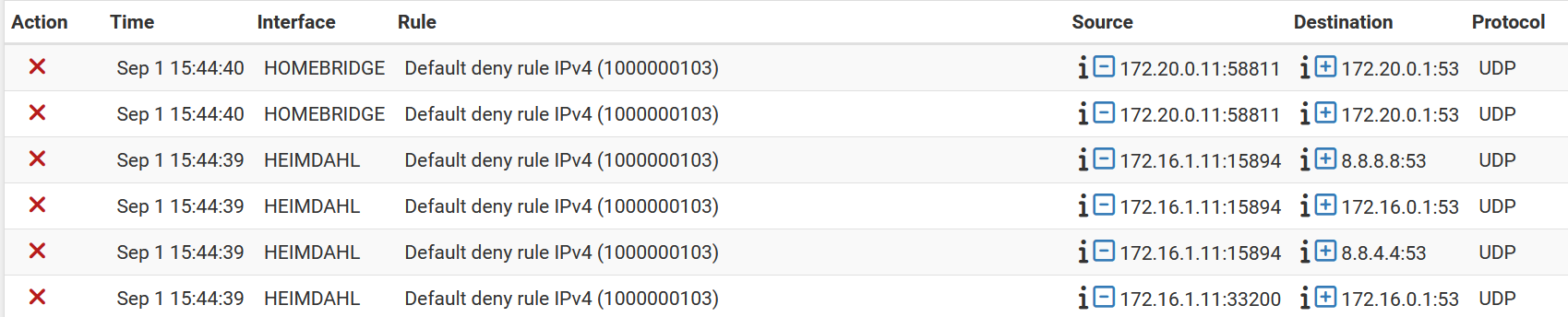
    @johnpoz I am not sure. I haven't really changed the config for a long time. I reinstalled the whole os last year when an upgrade to version 24 failed and then restored the config from the cloud. I am still on 23..09.1 and not willing to risk further upgrade. This is a Netgate 6100 Max.
  • Enable IPv6 fails silently

    1
    0 Votes
    1 Posts
    122 Views
    No one has replied
  • Firewall rules not working as expected...

    firewall log firewall rules
    11
    0 Votes
    11 Posts
    987 Views
    SteveITSS
    @mrpushner to test pinging to LAN you need to ping a device on LAN.
  • Rules didn't apply to the host on reboot

    27
    0 Votes
    27 Posts
    2k Views
    tinfoilmattT
    @nazar-pc I don't feel comfortable with my firewall trying to do anything with domain names, fully-qualified or not, in its ruleset.
  • Running Web Servers - Would using pfBlockerNG be good to use?

    6
    0 Votes
    6 Posts
    613 Views
    johnpozJ
    @carrzkiss said in Running Web Servers - Would using pfBlockerNG be good to use?: Any extra advice, or maybe a good video explaining it Not a video instruction fan to be honest - why sit through a 20 min video for 20 seconds of reading ;) Proper placement of rules key - need to understand that top down first rule to trigger wins, floating are evaluated before interface rules. Maybe you don't need allow rules. Depends on who is going to talk to your service.. For example I know my users of plex are going to be coming from US or Belgium.. And a few specific IPs that might be outside those too regions - so this is allowed.. But I also have zero use for stuff like shodan, or censys, digital ocean and few other bad ip/network lists - even if in the from a us IP. So I block those on a floating rule.. If rule doesn't trigger then it would hit the interface rule that is an allow. So this for sure keeps the bad stuff from talking to any of my ports, but my allows allow the guys in I want to allow. Since I have no use for anyone from a china IP talking to my services. Even if they are not on a known bad list as example.
Copyright 2026 Rubicon Communications LLC (Netgate). All rights reserved.