• H.323 Video Conference Codec behind PFSense *Guide / Explanation*

    Pinned Locked
    3
    0 Votes
    3 Posts
    30k Views
    D
    Long story short, to use H.323 behind a pfsense firewall, one needs to enable static-port NAT. Unfortunately neither H.323 nor SIP were designed with NAT in mind, in which case one needs either an ALG (which btw is part of Linux's netfilter since many years, but apparently missing from baseline pf/FreeBSD) or a NAT device that won't rewrite ports (a solution that will work if you only have one such device). Edit: Note that SIP software has been improved in recent years, and most recent implementations can work through NAT without a need for ALG or static ports, but it's still something one has to keep in mind when troubleshooting SIP issues.
  • Port Forward Troubleshooting

    Pinned Locked
    1
    3 Votes
    1 Posts
    33k Views
    No one has replied
  • NAT hairpin not working

    8
    1
    0 Votes
    8 Posts
    271 Views
    tinfoilmattT
    Make sure you've read through this article, Troubleshooting NAT Port Forwards, from the official docs. Specifically the pfSense software is not the border/edge router and Return Routing subsections may be of particular relevance.
  • NAT-PMP/PCP rules show ? for internal IP address

    2
    2 Votes
    2 Posts
    68 Views
    Bob.DigB
    I am not using it but a quick test confirms your findings. [image: 1778485423398-screenshot-2026-05-11-at-09-40-52-pfsense.internal-status-upnp-igd-amp-pcp.png]
  • pfSense Plus update disables xBox

    2
    0 Votes
    2 Posts
    86 Views
    U
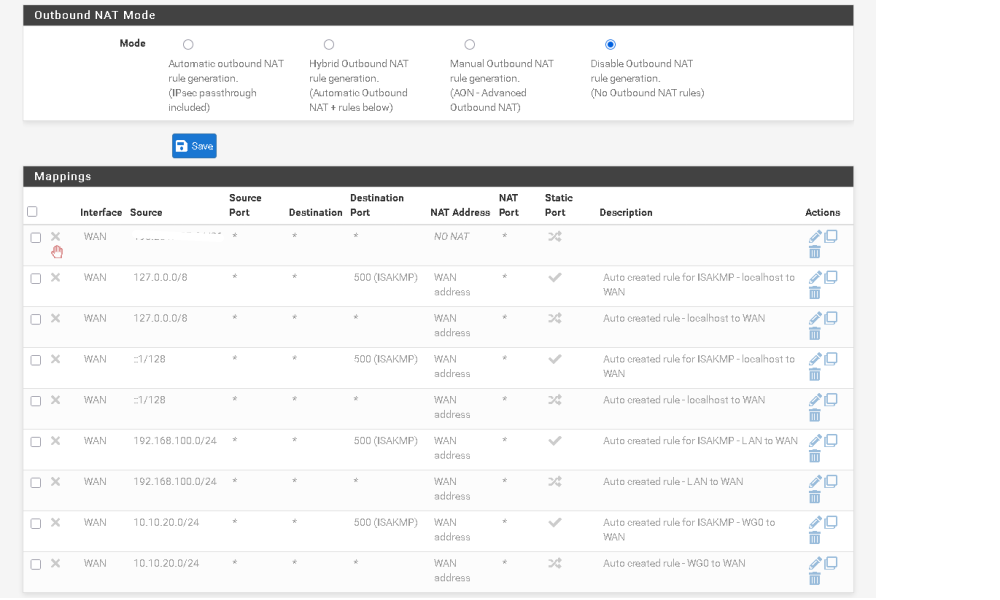
    Have you taken a look over in the gaming posts? https://forum.netgate.com/category/36/gaming The first 2 pinned post. I guessing your Xbox was not assigned a static address. So maybe , after the update it was assigned a differnt ip address and NAT stoped working, maybe. Here are my ps5 settings that give me NAT 2. static address: [image: 1778355070400-2026-05-09_12-30.png] firewall outbound NAT: [image: 1778355179214-2026-05-09_12-32.png] you will need to give more info on how you have gaming set up. This is just a guess on my part.
  • Strange issue with NAT64 - does not work for private IPv4 addresses

    4
    0 Votes
    4 Posts
    101 Views
    C
    So I found this option, which solves all my problems: [image: 1777887852722-screenshot-2026-05-04-at-10.43.31-resized.png]
  • SIP client on LAN ignoring 401 Unauthorized packet

    8
    0 Votes
    8 Posts
    1k Views
    Z
    For those appreciating closure: This problem is almost certainly caused by the Ricoh MP C3003 stack being unable to parse the rport parameter in the Via header of a SIP 401 Unauthorized response: Via: SIP/2.0/UDP 172.17.5.1;received=81.172.xxx.xxx;rport=2529;branch=z9hG4bKUns1ysLZx*LuI Transport: UDP Sent-by Address: 172.17.5.1 Received: 81.172.xxx.xxx RPort: 2529 Branch: z9hG4bKUns1ysLZx*LuI Note that this parameter is present in the dump of the failing connection with the cloud provider, but absent in the succeeding connection to my local Asterisk test server. A necessary remark here is that the latter was using chan_sip, which never includes this parameter, whereas the first was using pjsip. In the mean time, I have installed FreePBX on a Raspberry Pi 5 and I'm using that as a PABX in my house and as a proxy for this fax. It failed to this server is a very similar way and the solution turns out to be simple: In the fax extenstion's advanced settings, Force rport needs to be set to No for the registration to succeed and Rewrite Contact needs to be set to No for the options to be accepted.
  • 0 Votes
    4 Posts
    181 Views
    R
    Thanks here. I was really trying to avoid breaking something so making sure I understood how it works. Thanks for the confirmation.
  • Setting up SSH usingNetgate 2100 for tgraffic between 2 virtual lans

    3
    0 Votes
    3 Posts
    132 Views
    I
    @Gertjan Thanks for your suggestions
  • One solution for NAT rules failing

    8
    0 Votes
    8 Posts
    337 Views
    SteveITSS
    @Ross-Garmoe If the NAT rules were using a host alias with FQDN, pfSense resolves the FQDN every few minutes to create/update the pf alias. It's not really a NAT issue but if the table was empty it wouldn't create. I would have expected an error about an empty table/invalid alias though...at least that's the case for firewall rules. Assuming it was an internal domain name FQDN, another option would have been to set a domain override, so any DNS query hitting pfSense for the internal domain would get forwarded to the AD DNS server(s). Sounds like disabling pfSense DNS got pfSense to use AD DNS and resolve the FQDN? Anyway, glad it's working.
  • 0 Votes
    1 Posts
    81 Views
    No one has replied
  • IPsec NAT Only Works In One Direction

    1
    0 Votes
    1 Posts
    111 Views
    No one has replied
  • External access over CG-NAT

    10
    0 Votes
    10 Posts
    492 Views
    E
    @fabiolavor said in External access over CG-NAT: Okay! I can install Tailscale on my PC (PC1), but I can't install it on the PCs at my work because I don't have administrator access. I need another solution. I believe I already mentioned this in my first post. Sounds like someone is looking to bypass employer IT security policies to remotely access their home computer for what ever reason. Even if not nefarious, doing so on company time, which in most countries would be grounds for termination.
  • Creating a custom WAN interface

    2
    0 Votes
    2 Posts
    125 Views
    SteveITSS
    @Diggy This should be a starting point. Ignore the parts about gateway groups, etc. that apply to multiple WANs. https://docs.netgate.com/pfsense/en/latest/solutions/netgate-4200/opt-wan.html You could also reset it to a default config and start over?
  • SMB on WAN not working

    9
    0 Votes
    9 Posts
    445 Views
    johnpozJ
    @AndyRH said in SMB on WAN not working: Sometimes young is not trips around the sun, but time with a thing Exactly ;) Notice I said maybe you are too young to remember, sure that could be your actual age, or it could be how long you been in the IT game.. If you been in the game awhile you would clearly remember all the smb issues from back in the day ;) If you new then your too young to remember it ;)
  • ICMPv6 protocol missing from outbound NAT rule creation

    7
    1
    0 Votes
    7 Posts
    325 Views
    tinfoilmattT
    Just updating this thread for posterity—to confirm that "no nat" is the only way (and probably the only correct way) to resolve this leaking of a private WireGuard interface address. This did not work: nat on $WAN inet6 proto icmp from [WAN interface link-local]/128 to [ISP interface link-local]/128 -> [ISP interface link-local]/128 nat on $WAN inet from any to any -> [WireGuard interface address] port 1024:65535 nat on $WAN inet6 from any to any -> [WireGuard interface address] port 1024:65535 There's a mismatch there between "inet6" and "icmp". This may work if "icmp6" was available via the webConfigurator's NAT rule configuration "Protocol" dropdown: nat on $WAN inet6 proto icmp6 from [WAN interface link-local]/128 to [ISP interface link-local]/128 -> [ISP interface link-local]/128 nat on $WAN inet from any to any -> [WireGuard interface address] port 1024:65535 nat on $WAN inet6 from any to any -> [WireGuard interface address] port 1024:65535 But I've had to settle for this: no nat on $WAN inet6 from [WAN interface link-local]/128 to [ISP interface link-local]/128 no nat on $WAN inet6 proto udp from [WAN interface link-local]/128 port 546 to ff02::1:2/128 port 547 nat on $WAN inet from any to any -> [WireGuard interface address] port 1024:65535 nat on $WAN inet6 from any to any -> [WireGuard interface address] port 1024:65535 (Note that I also needed to add a "no nat" rule to preserve DHCPv6 functionality.)
  • ipsec vti with custom outbound nat bug?

    2
    5
    0 Votes
    2 Posts
    303 Views
    G
    any help with this?
  • Network to network NAT

    3
    0 Votes
    3 Posts
    1k Views
    E
    Yeah, 1:1 NAT isn't quite right here—it's for mapping public IPs to privates. What you want is source NAT (SNAT) or outbound NAT on your router/firewall (pfSense, OPNsense, etc.) for the surveillance subnet. Here's the deal: Cameras often ignore "foreign" subnet traffic. SNAT makes your management PC's requests appear from a local IP on the camera subnet (like your router's iface IP, e.g., 10.1.1.1). Camera sees "local" traffic and responds happily. Did this on my setup Reolink cams on isolated VLAN wouldn't talk cross-subnet. Added outbound NAT rule on cam interface: boom, access from main LAN via camera IPs. No camera config changes needed. Virtual IP forwarding works too (proxy ARP), but SNAT's simpler. Test routing first (ping with no NAT). YMMV if cameras hardcode super-strict checks.
  • 0 Votes
    3 Posts
    293 Views
    getcomG
    @netblues Yes, you are right, the default is unchecked. We checked that setting on several pfsense appliances and in some cases we found two of them with disabled firewall scrub. It is possible that there was another issue with that setting in the past.
  • Inbound NAT - L2TP Tunnel traffic not working

    5
    0 Votes
    5 Posts
    354 Views
    M
    So I had multiple issues, DNS been one so my alias were not working which in turn broke the NAT's. Also an alias ended up corrupting something as it had made it self too big taking the config file over 2500 lines once and I believe there is a 750 line limit. After some 30 hours of looking at this I am now working with thanks to various topics online I got there.
Copyright 2026 Rubicon Communications LLC (Netgate). All rights reserved.